-
Templates
1099 FormsAccurately report 1099 information returns and ensure IRS filing with easeExplore all templatesW-9 W-8 FormsEasily manage and share taxpayer details to streamline payments and meet IRS requirements with confidenceExplore all templatesOther Tax FormsFillable tax forms simplify and speed up your tax filing process and aid with recordkeeping.Explore all templatesReal EstateReal estate templates for all cases, from sale to rentals, save you a lot of time and effort.Explore all templatesLogisticsSimplify your trucking and logistics paperwork with our ready-to-use transportation and freight templates.Explore all templatesBill of SaleBill of Sale templates streamline the transfer of ownership with clarity and protection.Explore all templatesContractsVarious contract templates ensure efficient and clear legal transactions.Explore all templatesEducationEducational forms and templates enhance the learning experience and student management.Explore all templates
-
Features
FeaturesAI-Enhanced Document Solutions for Contractor-Client Success and IRS ComplianceExplore all featuresAI Summarizer Check out the featureAI PDF summarizer makes your document workflow even faster. Ask AI to summarize PDF, assist you with tax forms, complete assignments, and more using just one tool.Sign PDF Check out the featurePDFLiner gives the opportunity to sign documents online, save them, send at once by email or print. Register now, upload your document and e-sign it onlineFill Out PDF Check out the featurePDFLiner provides different tools for filling in PDF forms. All you need is to register, upload the necessary document and start filling it out.Draw on a PDF Check out the featureDraw lines, circles, and other drawings on PDF using tools of PDFLiner online. Streamline your document editing process, speeding up your productivity
- Solutions
- Features
- Blog
- Support
- Pricing
- Log in
- Sign Up


BIR Form 2307
Get your BIR Form 2307 in 3 easy steps
-
01 Fill and edit template
![Fill BIR Form 2307]()
-
02 Sign it online
![Sign BIR Form 2307]()
-
03 Export or print immediately
![Export BIR Form 2307]()


What Is BIR Form No. 2307?
It is also called a Certificate of Creditable Tax Withheld At Source.
What I need 2307 BIR form for?
Attach Form 2307 to the applicable tax return, according to the tax withheld.
- Quarterly/Annual Income Tax Return – BIR Forms 1701Q / 1701 for individuals or BIR Form 1702Q/ 1702 for non-individuals;
- Quarterly Percentage Tax return (BIR Form No. 2551Q) — for Percentage Taxes on Government Money Payments;
- Quarterly VAT Return (BIR Form No. 2550Q) — for VAT Withholding.
Filling out BIR Form No. 2307
The form has only one page. In addition, there are also the Schedules of Alphanumeric Tax Codes. BIR Form No.2307 has three parts:
- Part I covers payee information and Part II payor information, such as TIN, name, and full address;
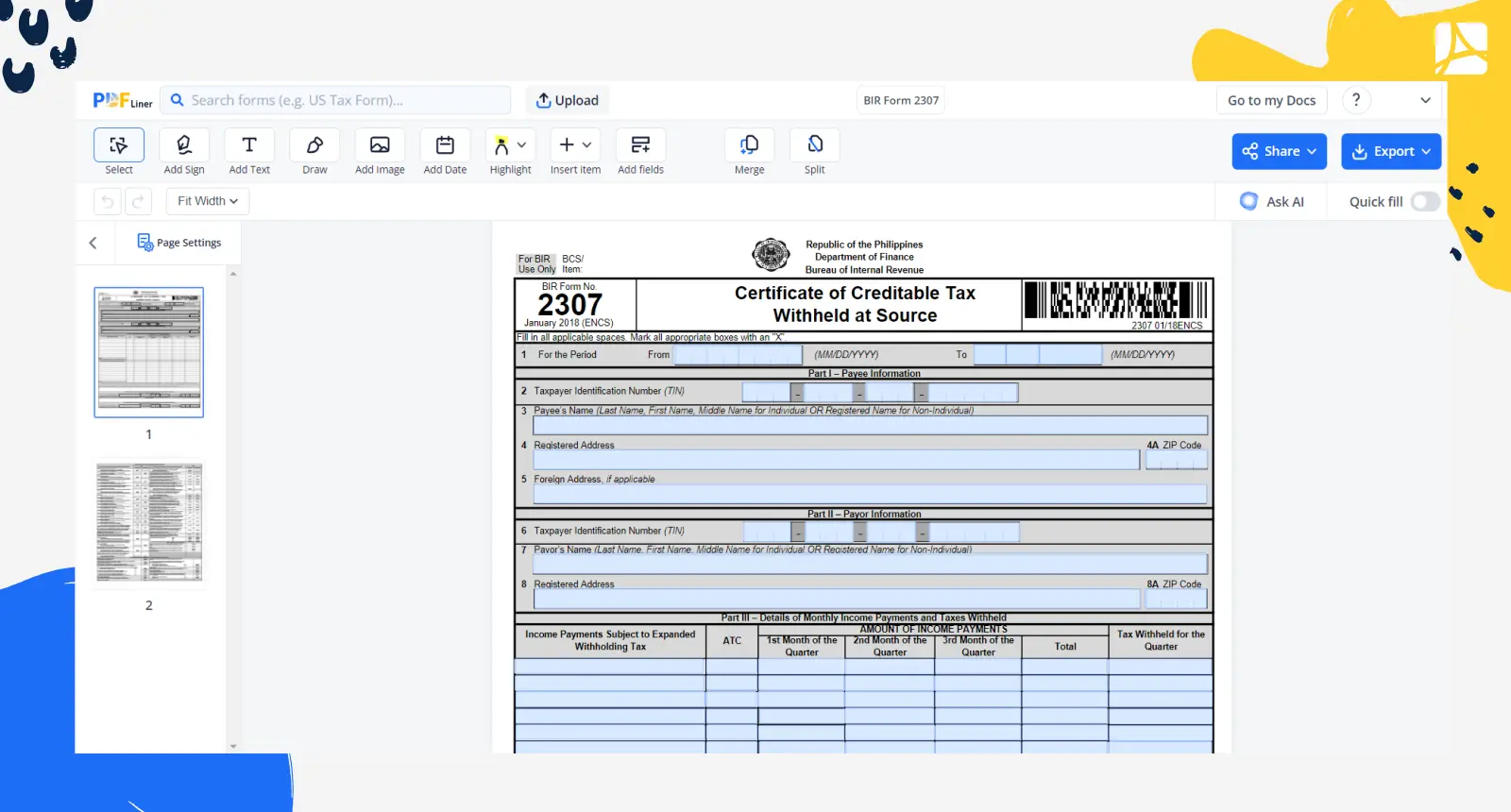
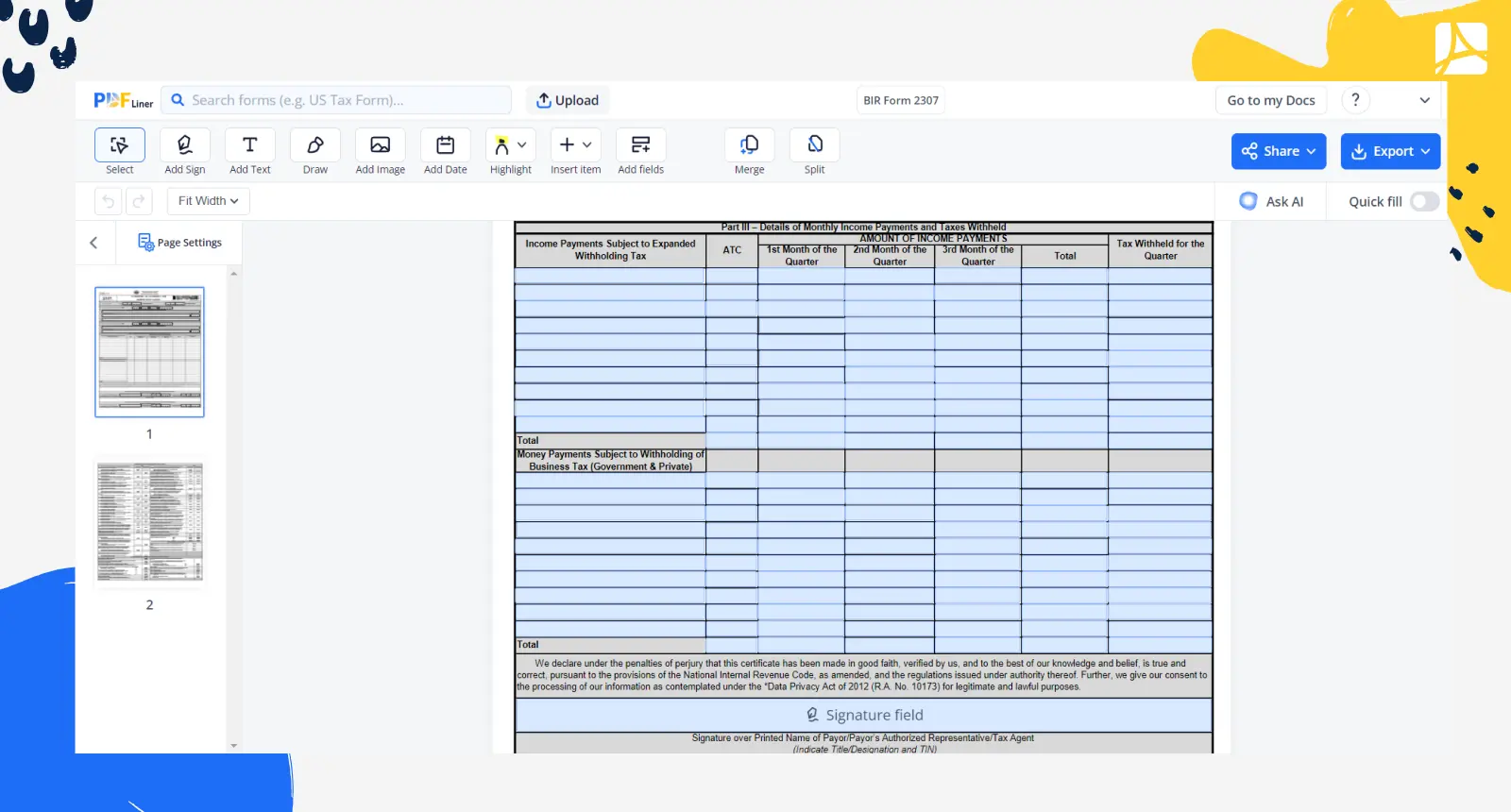
- Part III covers the details of monthly income payments and taxes that were withheld throughout the quarter. The table divides into two parts: income payments subject to expanded withholding tax and money payment subject to withholding of business tax. The amount of income payments table includes the columns related to each month in the quarter.
Checklist before you issue Form 2307
Based on the January 2018 (ENCS) edition of the form shown on this page:
- Item 1: the period covered, From and To, in MM/DD/YYYY.
- Part I, payee: TIN (item 2), name (item 3: last, first, middle name for an individual, or the registered name for a non-individual), registered address and ZIP code (items 4 and 4A), and a foreign address if applicable (item 5).
- Part II, payor: TIN (item 6), name (item 7) and registered address with ZIP code (items 8 and 8A).
- Part III: for each income payment, its alphanumeric tax code (ATC) from the schedule printed with the form, the amount paid in each month of the quarter, the total, and the tax withheld for the quarter. Money payments subject to withholding of business tax go in the second table.
- Signatures: the payor or its authorized representative or tax agent signs the declaration (with title, designation and TIN), and the payee or its representative signs the CONFORME. A tax agent also fills in the accreditation or roll number and its dates.
- The form asks you to fill in all applicable spaces and to mark all appropriate boxes with an "X".
Worked example (illustrative)
A company pays an individual engineer professional fees of 20,000.00 in each month of a quarter. The ATC schedule printed with the form lists WI010 for an individual professional "If gross income for the current year did not exceed P 3M", so Part III gets one line:
- ATC: WI010
- 1st month: 20,000.00; 2nd month: 20,000.00; 3rd month: 20,000.00
- Total: 60,000.00
- Tax withheld for the quarter: the total multiplied by the withholding rate that applies to WI010 under current BIR rules (check the rate with the BIR before you file; the form itself does not print it).
The numbers are an example of how the columns add up, not tax advice.
FAQ: Let’s Go Through BIR Form 2307 Popular Questions
-
What is the use of BIR Form 2307?
The BIR form 2307 form is also known as Certificate of Creditable Tax Withheld as Source. The document is addressed to the EWT paid by the agent.
-
How to compute BIR form 2307?
It is easy to get lost in the document. Once you receive this form, you need to perform the next steps:
- For EWT, attach Form 2307 to the quarterly or annual income tax return and claim the withholding as an income tax credit. Don’t miss the deadlines.
- Mention the numbers in the SAWT;
Related Content - BIR Form 2307
-
![]() PH BIR 2316What Is PH BIR 2316? BIR Form 2316 records an employee's compensation paid and income...
-
![]() BIR Form 1701QWhat Is BIR Form 1701Q Also referred to as Quarterly Income Tax Return for Individuals,...
-
![]() BIR Form 1601-EQWhat Is a BIR Form 1601-EQ A BIR 1601EQ is also identified as the quarterly...
-
![]() BIR Form 0619-EWhat Is BIR Form 0619 E Also known as Monthly Remittance Form of Creditable Income...
-
![]() BIR Form 2000Understanding the 2000 BIR Form The 2000 BIR Form is a document specifically constructed by...


Fillable online BIR Form 2307 PDF