-
Templates
1099 FormsAccurately report 1099 information returns and ensure IRS filing with easeExplore all templatesW-9 W-8 FormsEasily manage and share taxpayer details to streamline payments and meet IRS requirements with confidenceExplore all templatesOther Tax FormsFillable tax forms simplify and speed up your tax filing process and aid with recordkeeping.Explore all templatesReal EstateReal estate templates for all cases, from sale to rentals, save you a lot of time and effort.Explore all templatesLogisticsSimplify your trucking and logistics paperwork with our ready-to-use transportation and freight templates.Explore all templatesMedicalMedical forms help you keep patient documentation organized and secure.Explore all templatesBill of SaleBill of Sale templates streamline the transfer of ownership with clarity and protection.Explore all templatesContractsVarious contract templates ensure efficient and clear legal transactions.Explore all templatesEducationEducational forms and templates enhance the learning experience and student management.Explore all templates
-
Features
FeaturesAI-Enhanced Document Solutions for Contractor-Client Success and IRS ComplianceExplore all featuresAI Summarizer Check out the featureAI PDF summarizer makes your document workflow even faster. Ask AI to summarize PDF, assist you with tax forms, complete assignments, and more using just one tool.Sign PDF Check out the featurePDFLiner gives the opportunity to sign documents online, save them, send at once by email or print. Register now, upload your document and e-sign it onlineFill Out PDF Check out the featurePDFLiner provides different tools for filling in PDF forms. All you need is to register, upload the necessary document and start filling it out.Draw on a PDF Check out the featureDraw lines, circles, and other drawings on PDF using tools of PDFLiner online. Streamline your document editing process, speeding up your productivity
- Solutions
- Features
- Blog
- Support
- Pricing
- Log in
- Sign Up


20 min
Complete IMM 5710 Form
⚠️We do not offer direct or indirect submission options online or offline, but you can learn how to fill out the form and share the sample with your advisor for submission guidance.
What You Need to Know
- 📎Please complete IMM 5710 only if you are already in Canada; if you need a work permit and are outside of Canada, use form IMM 1295 instead (some people can instead apply when they arrive at a Canadian port of entry).
- 📎At PDFLiner, you can only prepare to submit this form by filling in this example and using the document checklist for your case (IMM 5556 for workers applying in Canada, IMM 5583 for students applying for a work permit, IMM 5557 for a temporary resident permit applied for from inside Canada; online applicants get a personalized checklist). Do not file this PDFLiner sample with IRCC.
- 📎Click the “Share” button once you’ve entered all the information, and send the form to your consultant to check if everything is correct before completing the official document.
- 📎If you haven't been assigned a UCI yet, IRCC's general guidance is to write "Not Applicable" or "N/A" in the UCI space; in the online application, leave the space empty.
- 📎It’s important to give honest and accurate information here, as the IRCC can double-check it.
What Is IMM 5710 Form
Interested in extending your stay or changing your work conditions in Canada? If you are in Canada and eligible to apply from inside Canada, the IMM 5710 form is what you need. It's an application from Immigration, Refugees and Citizenship Canada (IRCC) for people in Canada who want to extend their work permit or change the conditions of their stay, including eligible people applying for an initial work permit from inside Canada. Eligible students applying for a work permit (for example, a post-graduation work permit) also use IMM 5710. Visitors extending their stay apply for a visitor record (IMM 5708), and students extending or changing the conditions of their study permit use IMM 5709.
This form is a critical step for workers in Canada who want to continue contributing to its society. Through the IMM 5710, you state what you are applying for, the original purpose for coming to Canada and the type of work permit you are applying for, giving Canadian officials a clear picture of your intentions.
When To Use and Not To Use Form
You should use the IMM 5710 Form PDF in one of the following cases:
- Extending Your Stay: If your work permit is about to expire and you want to keep working in Canada, this form can help you apply for an extension. Apply before your work permit expires: an online application must be submitted before midnight Coordinated Universal Time (UTC) on the day the permit expires. If you submit a complete application before your work permit expires, you can stay in Canada while IRCC processes it (maintained status), as long as you remain in Canada. An application rejected as incomplete is treated as never submitted and does not give you maintained status. If your permit expires while you wait, you can keep working until IRCC decides, but only under the same conditions as your current permit (with an employer-specific permit, the same employer, job and work location). If you only need more time in Canada to get ready to leave and will not keep working, apply to change your status to visitor (a visitor record) instead of extending your work permit; you can keep working only until your work permit expires.
- Changing Conditions: If you have an employer-specific work permit and want to change employers, or if you need a different type of work permit, fill out this form to apply for it, provided you are eligible for that permit type. Open work permit holders can change employers without a new work permit while their permit is valid, provided they continue to meet its conditions and the employer is eligible to hire them. With an employer-specific permit, you start the new job once the new permit is issued, unless IRCC authorizes you to work for the new employer while it processes your application.
- Transitioning Work Categories: If moving to a different kind of work requires a new work permit and you are eligible to apply from inside Canada, use IMM 5710 to apply. Submitting the form does not by itself authorize the change: follow the conditions of your current permit until IRCC issues the new permit or separately authorizes the new work.
However, there are cases when you should consider another form:
- First-Time Applicants Outside Canada: People outside Canada applying for a work permit use IMM 1295 (some people can instead apply when they arrive at a Canadian port of entry). If you're applying for your first work permit from inside Canada and you are eligible to do so, IMM 5710 is the form to use.
- Permanent Residency Applications: Those seeking permanent residency in Canada must explore different forms specific to permanent immigration routes.
- Visitor or Student Extensions: If you're visiting or studying in Canada and wish to extend your stay, there are other forms designed specifically for that purpose: visitors apply for a visitor record (IMM 5708), and students extending or changing the conditions of their study permit use IMM 5709.
- Co-op Student Placements: From April 1, 2026, post-secondary students who meet IRCC's eligibility requirements no longer need a separate co-op work permit. Secondary-level students still need a co-op work permit and a study permit. Check IRCC's student work placement rules before you start a co-op work permit application.
Finding the right form for your situation is imperative to ensuring a smooth immigration process. If you're uncertain which form aligns with your needs, IRCC's Find an application form page lists the forms and application packages for each program.
How To Fill Out Form: Line-by-line Instructions
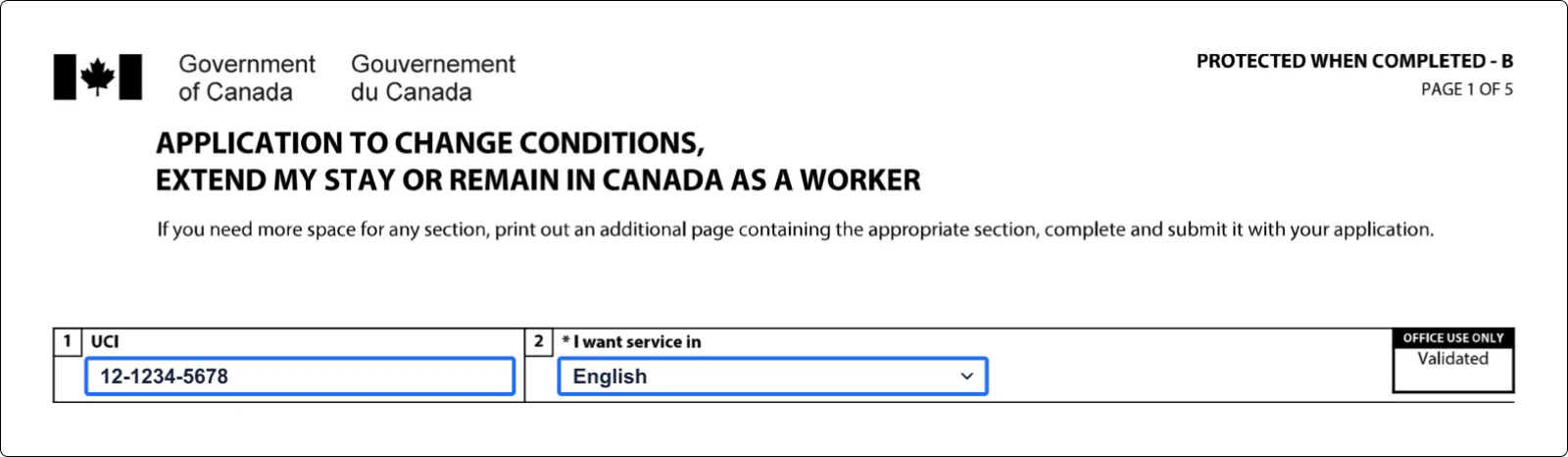
Step 1: UCI
UCI, or Unique Client Identifier, is crucial because it helps the IRCC identify you in their system. Think of it as your personal ID number within Canada's immigration framework. It comprises either eight or ten digits. For example, you might see a UCI formatted as "0000-0000" (8 digits) or "00-0000-0000" (10 digits).
You'll find your UCI on the documents you receive from IRCC. If you haven't applied for anything with IRCC before, you likely won't have a UCI yet. But once you do, it'll be your key identifier for all future correspondence and applications with Canadian immigration. It's a good idea to keep this number handy and secure, as it’s an important piece of your immigration story in Canada.
Note: If you haven't been assigned a UCI yet, IRCC's general guidance is to write "Not Applicable" or "N/A" in the UCI space; in the online application, leave the space empty.
Step 2: Language
In item 2, choose the language (English or French) in which you want to receive service. The form itself comes in an English edition and a separate French edition (IMM 5710 F).
Step 3: Choose the reason for the application
In the 3rd section, you need to tick one or more reasons to apply:
- Apply for a work permit with the same employer: This is in case you already have a work permit and want to extend it to continue working for your current employer in Canada.
- Restore my status as a worker: Use this option if you lost your worker status (for example, your work permit expired and you did not apply to extend it in time; if your permit shows a later "Must leave Canada by" date, your status lasts until that date) and you are applying to restore it, normally within 90 days of losing it (IRCC's measures for natural disasters in Canada from April 1, 2026 to November 30, 2028 cover eligible people who had valid temporary resident status when directly affected; the application deadline is six months from the date they were affected, not from the date they lost status; check the policy's eligibility and document requirements); you normally cannot work until your status is restored and a new work permit is issued. A later "Must leave Canada by" date does not by itself extend your permission to work after the work permit expires.
- Apply for a work permit for the first time or with a new employer: If you're applying for your first work permit from inside Canada (only possible in specific situations, for example if you hold a valid study permit), or if you have an employer-specific work permit and want to change employers, this is your reason to apply: you need a new work permit (open work permit holders can change employers without one while their permit is valid, subject to any restrictions on it).
- Get a new temporary resident permit: This permit (an initial one, or another one when your current permit is expiring) is for people who are inadmissible to Canada or do not meet the requirements of the Immigration and Refugee Protection Act but have a compelling reason to be here for a short time; it is issued only at an officer's discretion. TRP applicants do not get maintained status while their application is processed. If you are applying from inside Canada for a TRP together with an open work permit, IRCC tells you to tick both "Get a new temporary resident permit" and "Apply for a work permit for the first time or with a new employer".

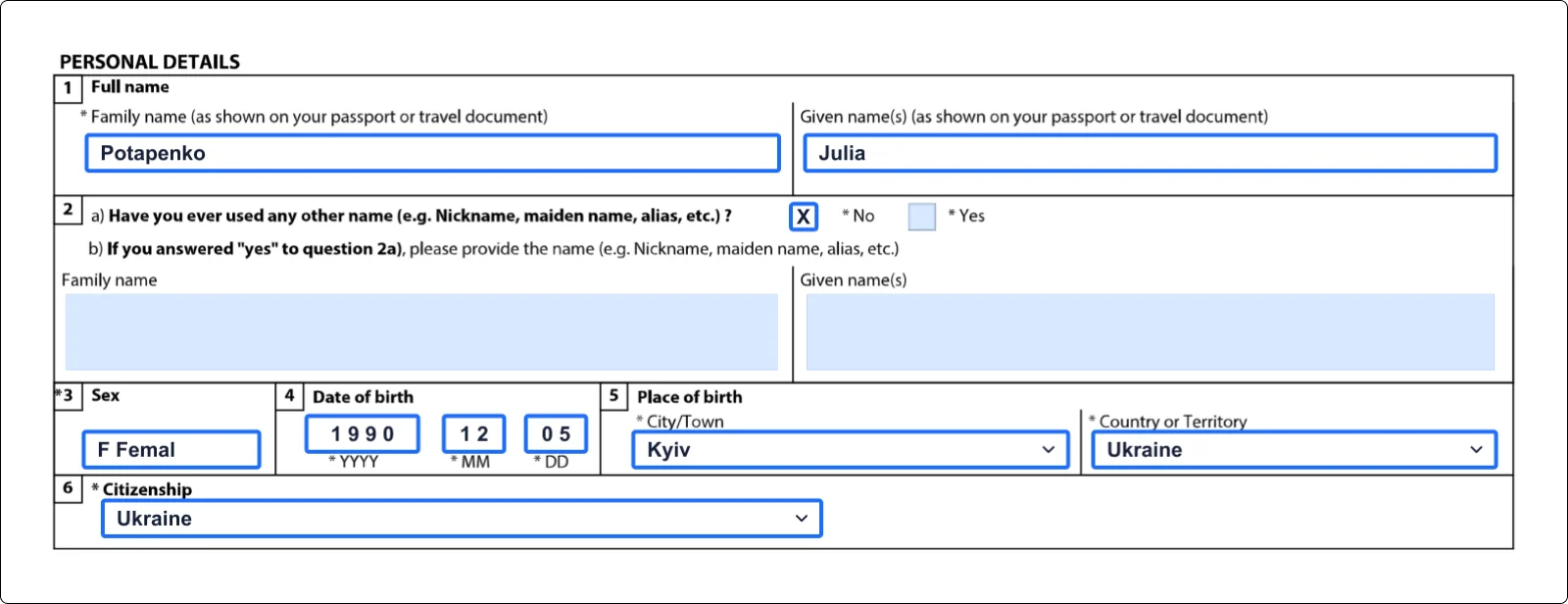
Step 4: Personal details
To fill in this section, open your passport or travel document. Enter your family name and given name(s) exactly as shown on it, then complete the other details:
- 1. Your family name (surname);
- 2. Given name (first name, middle name, etc.);
- 3. All other names you have ever used (for example, a birth name, maiden name, married name or nickname);
- 4. Sex;
- 5. Date of birth;
- 6. City and country of birth;
- 7. Citizenship.
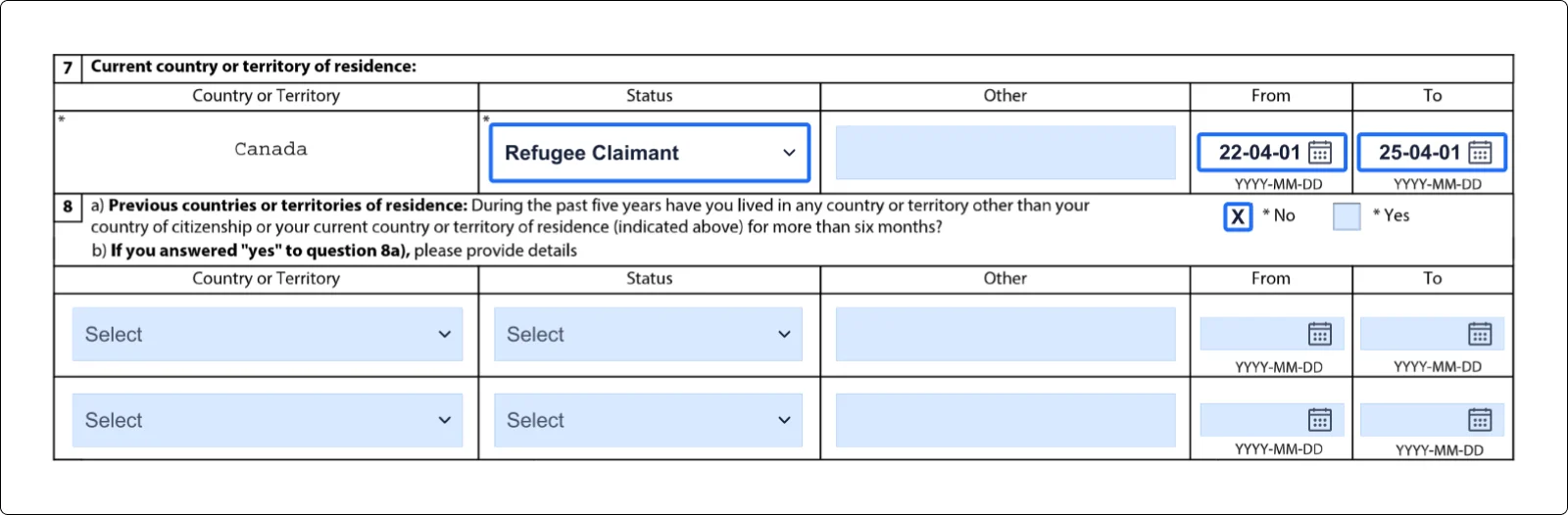
Step 5: Status of residence in Canada
In section 7, you'll need to detail your current living situation in Canada. Individuals from other countries can hold various residence statuses, each with its own rights and responsibilities. Here's a brief look at some common statuses:
- Citizen: This is the status held by people who are Canadian by birth in Canada (with a few exceptions), by descent from a Canadian parent where the citizenship-by-descent rules are met (for example, a child born abroad on or after December 15, 2025 to a Canadian parent who was also born abroad generally needs that parent to have spent at least 1,095 days in Canada before the birth), or through a grant of citizenship after being a permanent resident. Citizens have full rights, including voting and holding a Canadian passport.
- Permanent Resident: People with this status have been granted the right to live permanently in Canada. They can work, study, and access social services but cannot vote or run for political office, and may lose their status if they do not meet the residency obligation (at least 730 days in each five-year period; days physically present in Canada count, and so do some days abroad, for example accompanying a spouse or common-law partner who is a Canadian citizen or, in the case of a child, a parent who is a Canadian citizen; someone who has been a permanent resident for less than five years must show they will be able to meet the obligation for the five years after becoming a permanent resident), after an official decision.
- Visitor: Often referred to as a tourist, this is for individuals who are in Canada temporarily for leisure, family visits, or business trips. Visitors usually have a stay limit, cannot work without authorization (a few activities are exempt from needing a work permit) and generally need a study permit for a program longer than 6 months (some people, such as certain minor children, are exempt).
- Worker: Held by people authorized to work in Canada, usually with a work permit (some work is exempt from needing one). A work permit typically allows work for a specified employer and period. Some work permits are open: an open work permit generally lets you work for different employers, subject to any restrictions on the permit (for example, on the type of work or where you can work). You cannot work for an employer listed as ineligible on IRCC's list of non-compliant employers, or for a business that regularly offers striptease, erotic dance, escort services or erotic massages.
- Student: This status is for those approved to study at a Designated Learning Institution (DLI) in Canada. Study permit holders must stay enrolled and actively pursue their studies unless they are exempt (regularly scheduled breaks and authorized leaves of up to 150 days are allowed). Student status allows limited work under specific conditions: eligible students can work off campus up to 24 hours per week during regular school terms and unlimited hours during breaks scheduled by their school, but they cannot work during an authorized leave from their studies (IRCC has a separate rule for a school temporarily closed by a strike).
- Protected Person: This status belongs to people on whom refugee protection has been conferred in Canada, for example people the Immigration and Refugee Board has found to be Convention refugees or persons in need of protection. They may eventually apply for permanent residence.
- Refugee Claimant: This category is for people who have claimed refugee protection but have not yet received a decision (for a claim made in Canada, IRCC or the Canada Border Services Agency first checks whether it is eligible, and eligible claims are sent to the Immigration and Refugee Board, which decides them).
- Foreign National: A person who isn't a Canadian citizen or permanent resident (this includes stateless people). They can be tourists, students, workers, or people seeking to immigrate. Their activities and stay in Canada are subject to their specific visa or permit terms.
- Other: for example, a person restoring their status selects "Other", types "Out-of-status – restoration" and leaves the From and To boxes blank.

Step 6: Other countries' statuses
If you have lived in a country other than your country of citizenship or your current country of residence for more than 6 months in the past 5 years, you should indicate this by replying “Yes” and providing information about the country, your status there, and the length of your stay. Otherwise, check “No” and move on.
Note:
It’s important to give your honest and accurate reply here, as the IRCC can double-check this information.
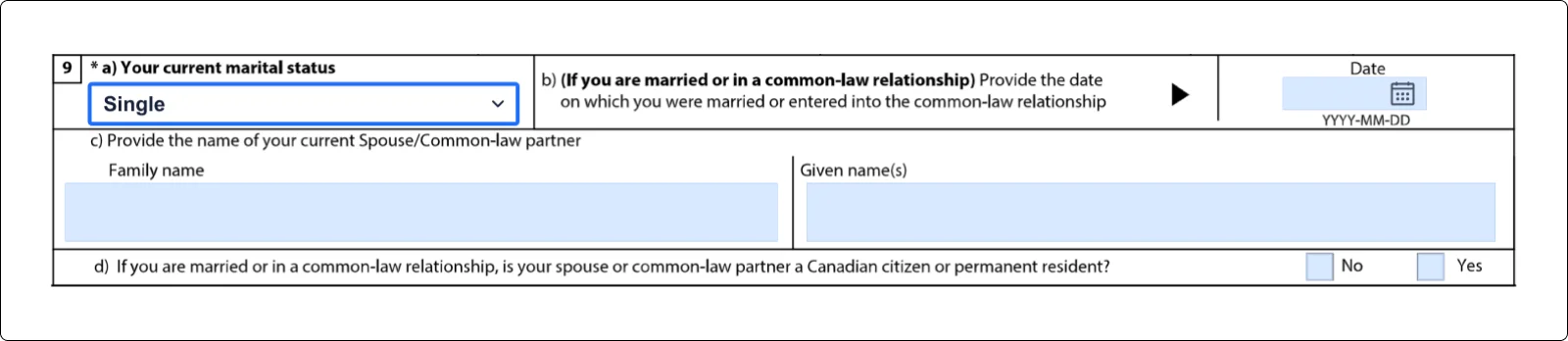
Step 7: Marital status
Choose your current marital status, and if you are married or in a common-law relationship, provide details about your partner.
Step 8: More personal detail
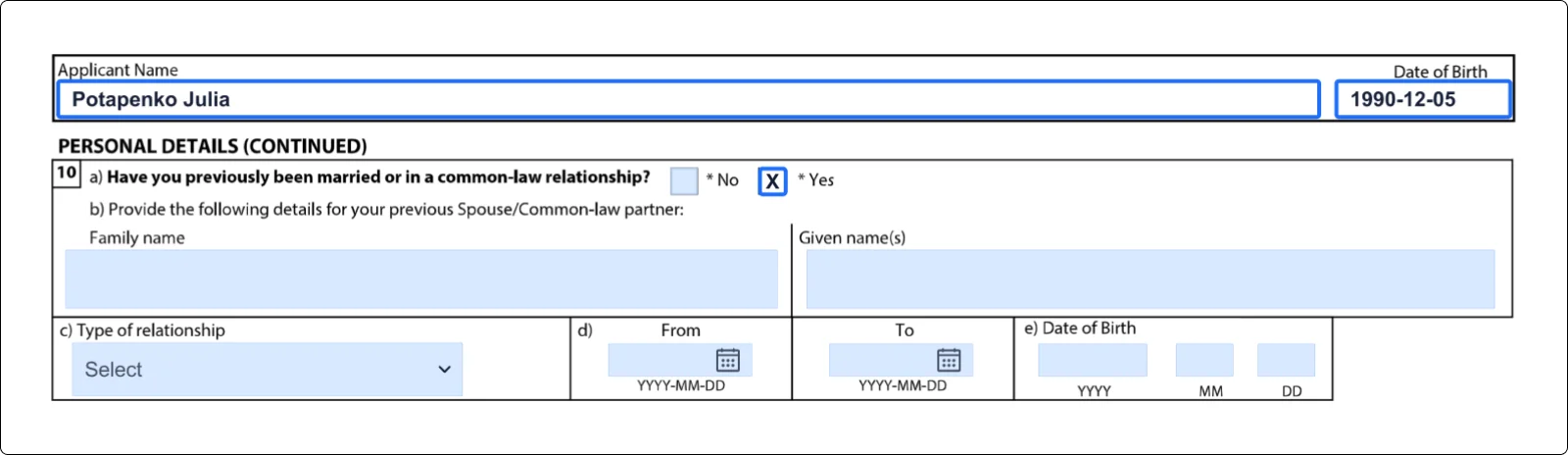
On the second page, you need to start by writing your name and date of birth in the first two fields. The same Applicant Name and Date of Birth boxes are repeated at the top of pages 3, 4 and 5. Then you would need to give info about your previous relationships if you had them.
Step 9: Language
In this section, you need to provide information about your native language, say whether you are able to communicate in English and/or French and in which language you are most at ease, and specify whether you’ve been tested.

Step 10: Passport details
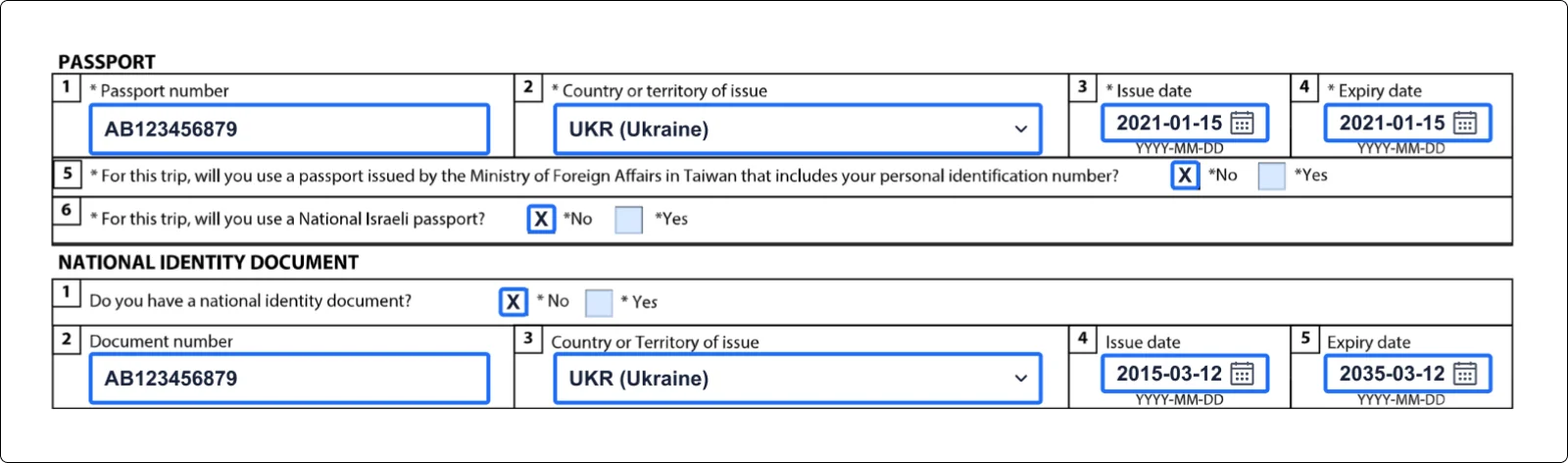
In these sections you provide the number, country of issue and dates of your passport and of your national ID document (if you have one), and, if you are a lawful permanent resident of the United States, your green card details. IRCC can't issue a work permit that is valid past the expiry date of your passport, so check whether you need to renew it first.
Step 11: Contact information
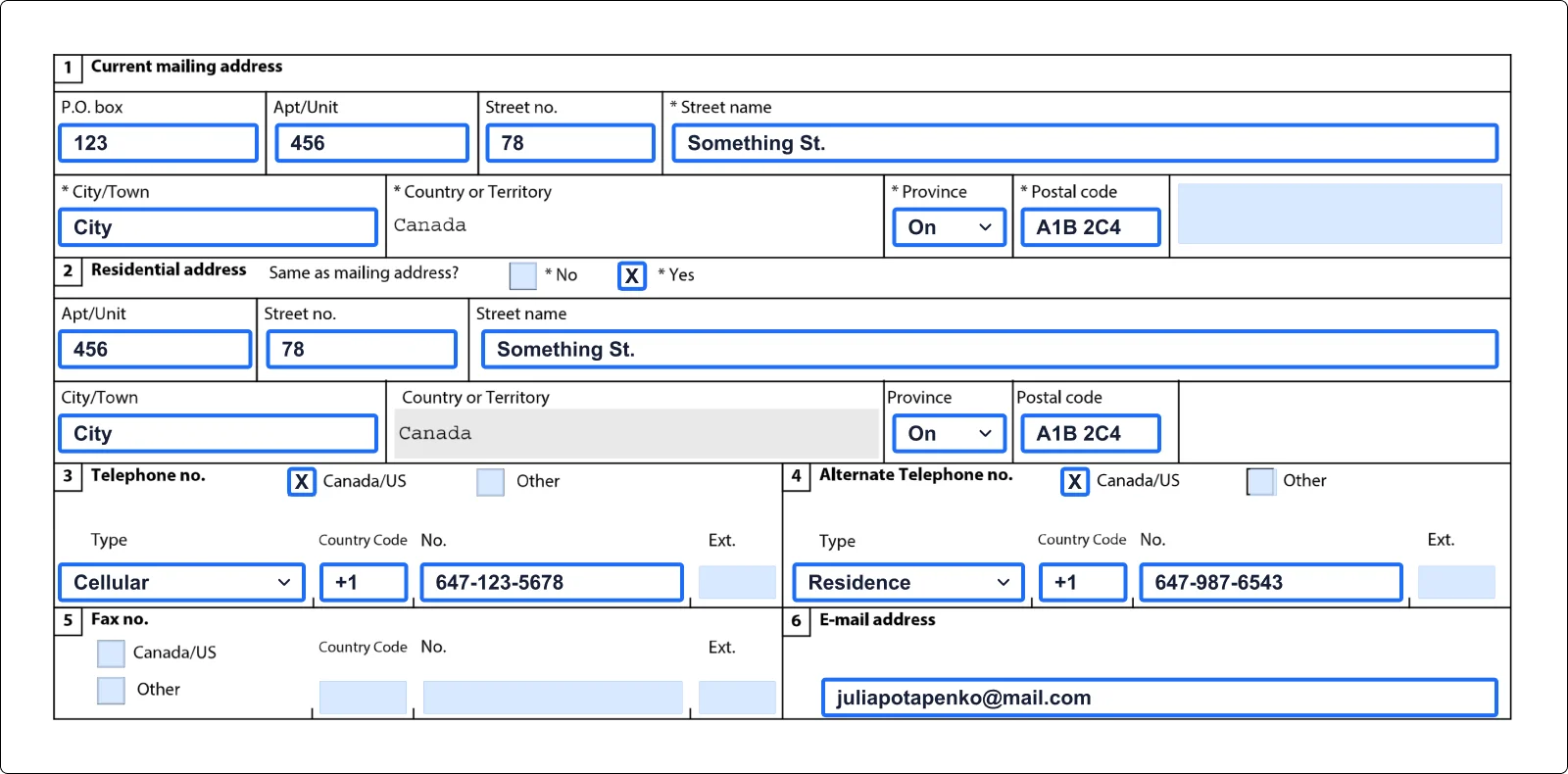
Provide the following information:
- 1. your mailing address;
- 2. residence address (mark if it’s the same as your mailing address);
- 3. contact phone number and alternative phone number;
- 4. fax number (if you have one);
- 5. contact email address.
Step 12: Coming into Canada
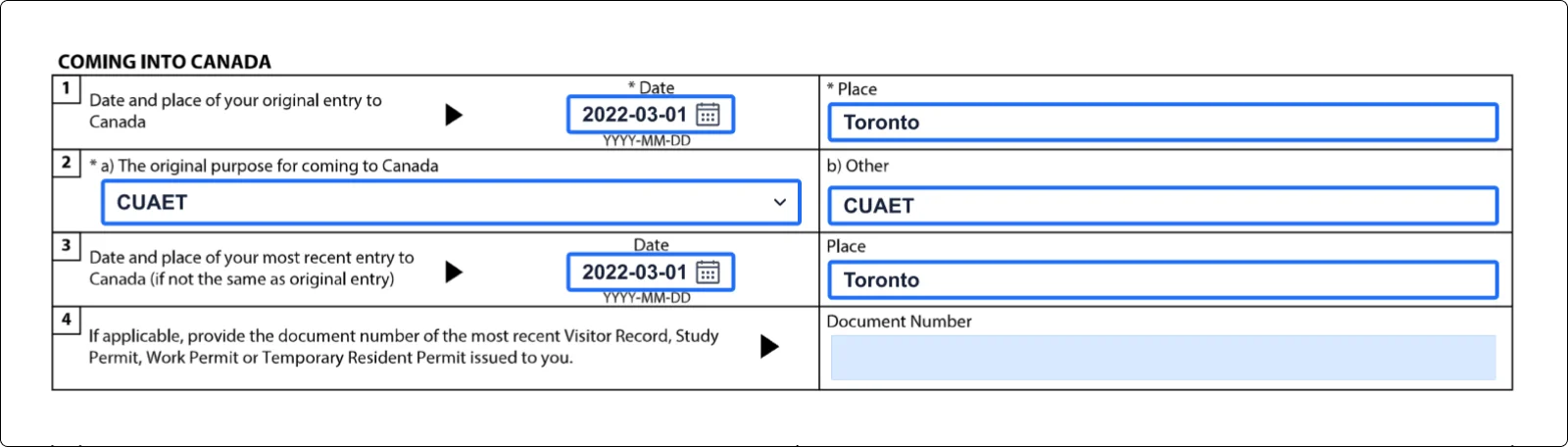
In this section, you enter the date and place of your first and your most recent entry to Canada, the purpose of your original visit, and the document number of your most recent visitor record, study permit or work permit.
Step 13: Details of intended work
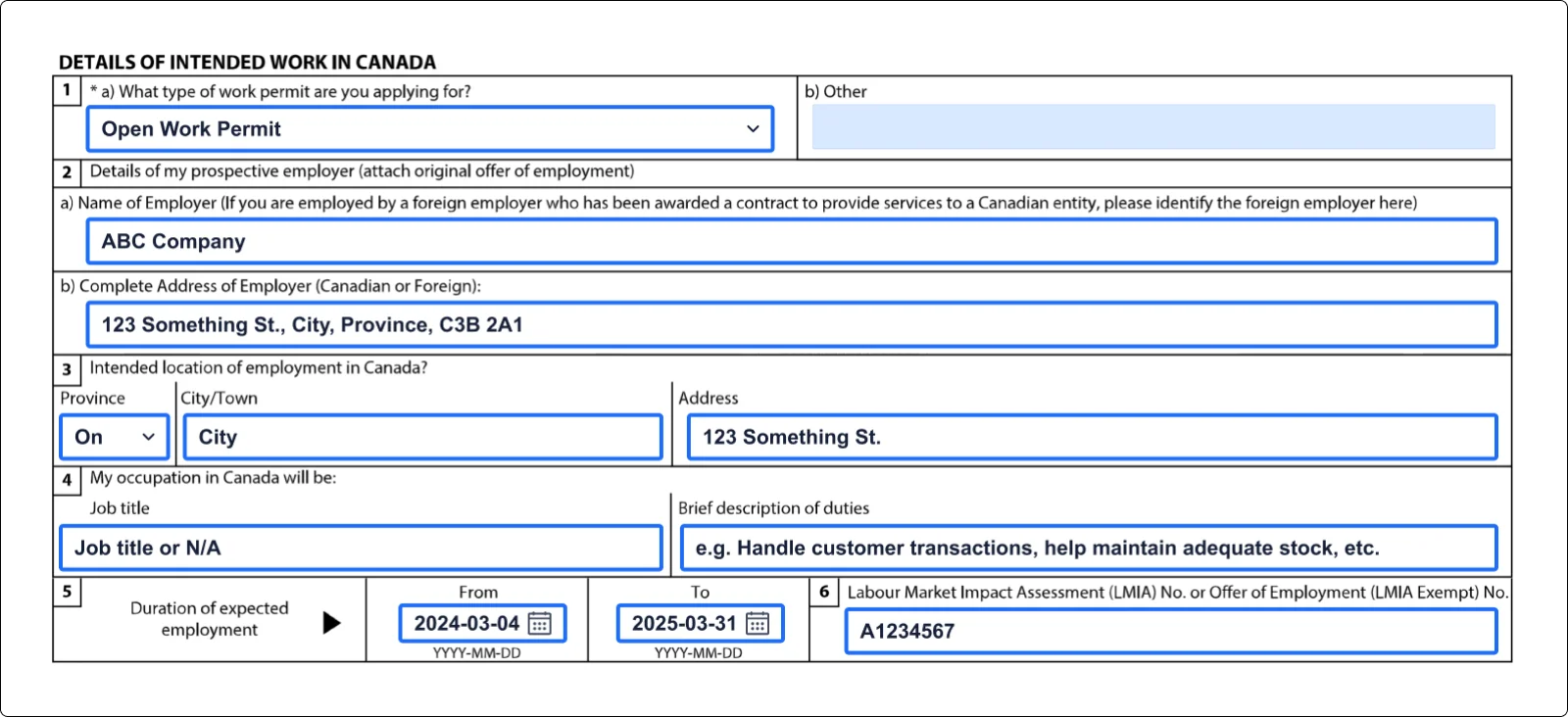
This section is probably the most important one for a work permit. Select the type of work permit you want. If you are applying for an employer-specific work permit, carefully enter your employer, the job and its duties, and the Labour Market Impact Assessment number or the offer of employment number (the number is not required for a co-op or post-graduation work permit, and some LMIA-exempt employers, such as foreign missions, do not issue an offer number). If you choose "Open Work Permit" or "Post-Graduation Work Permit", leave questions 2 to 8 of this section blank.
Note:
Your employer gets these numbers: an LMIA number from the LMIA process, or an offer of employment number once it submits the job offer in the IRCC Employer Portal.
Step 14: Education details
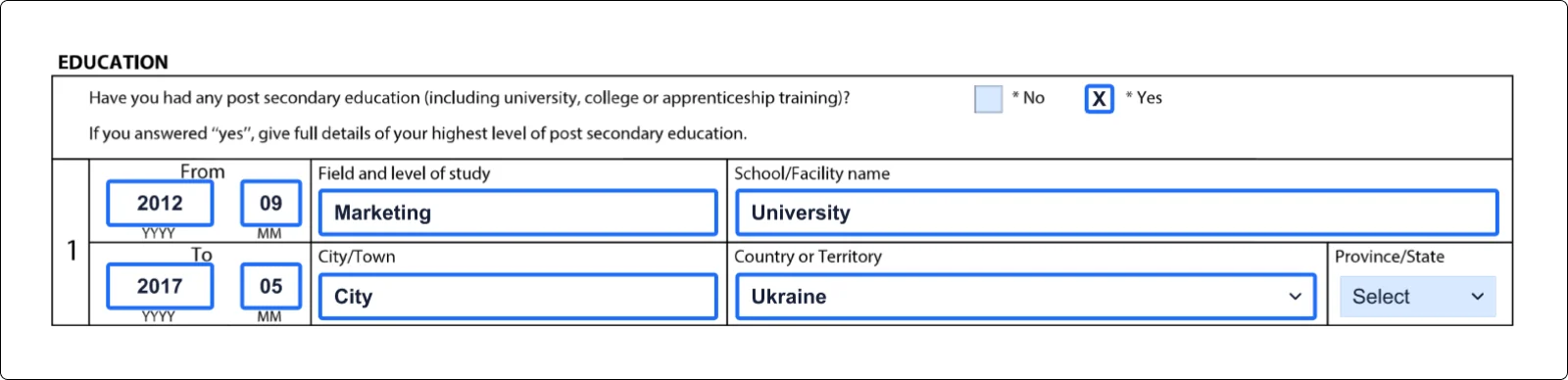
Next, you are asked whether you have had any post-secondary education (including university, college or apprenticeship training) and, if so, to give full details of your highest level of post-secondary education; your education records can help you check these details.
Step 15: Previous employment
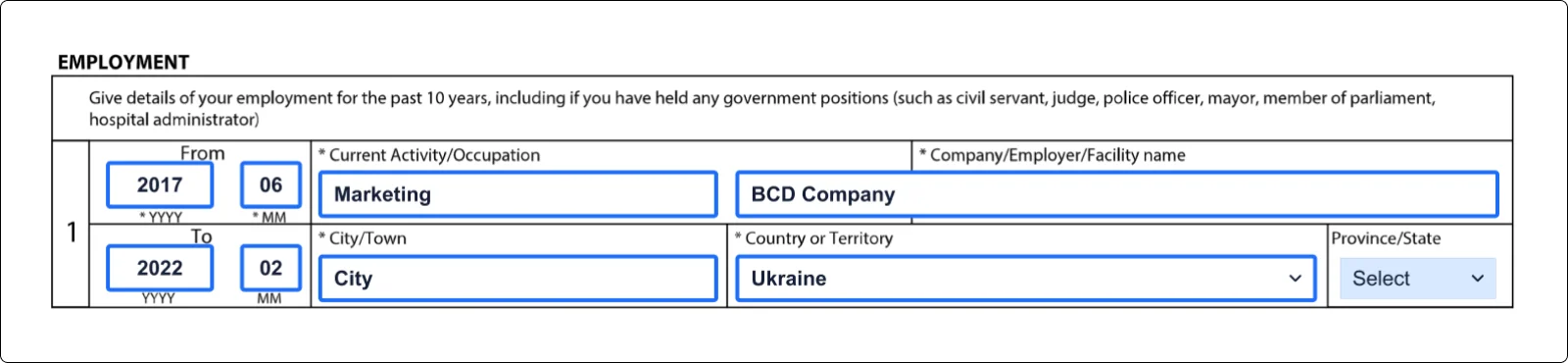
If you are applying for a co-op or post-graduation work permit, IRCC's instructions say you do not need to fill in this section. Otherwise, enter your employment details for the past 10 years (including any government positions), starting with your current activity or occupation; if you are retired, give the 10 years before your retirement.
Step 16: Background information
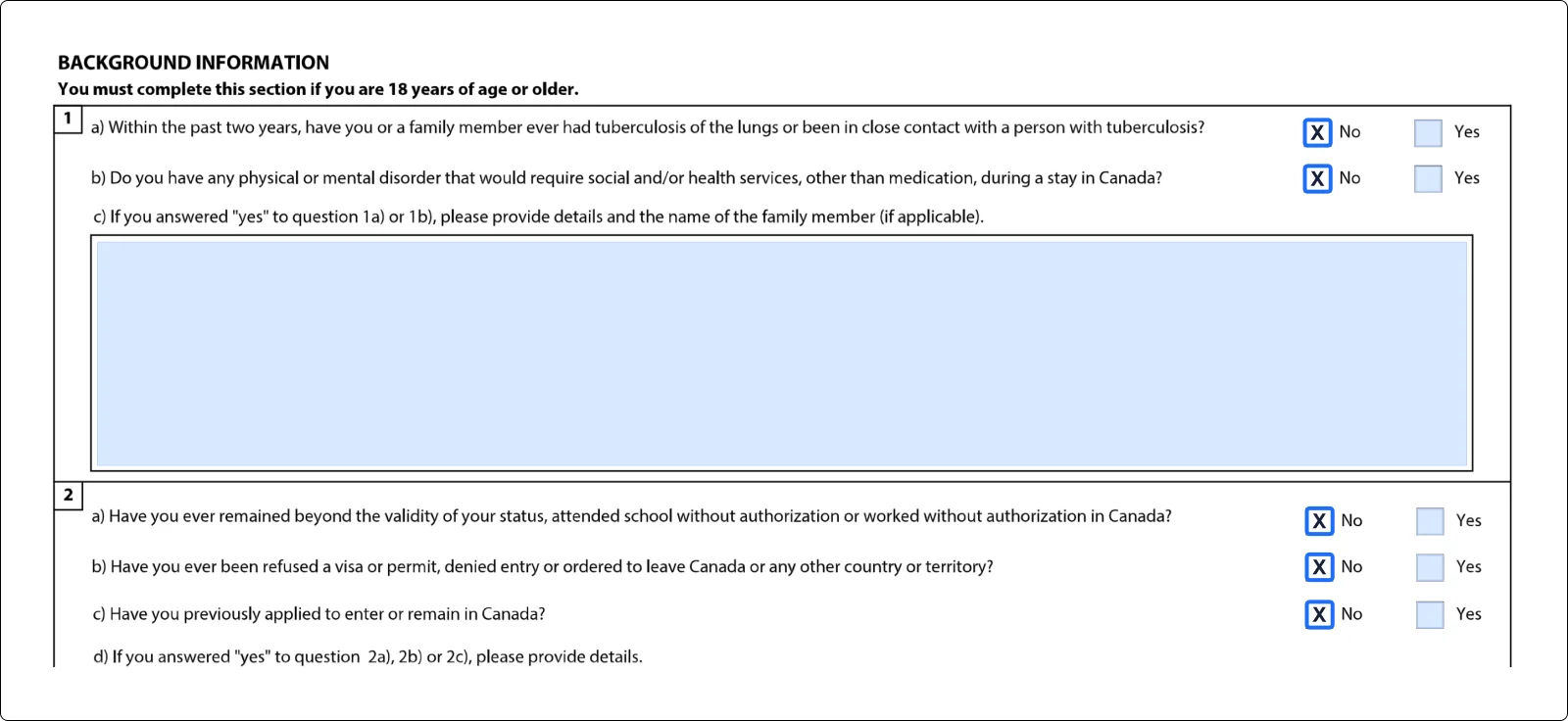
The last question section of the form, before the signature and disclosure, asks about your background. Answer all six questions: IRCC treats an application with unanswered background questions as incomplete and returns it. If you answer “Yes” to background questions 1 to 4, the form asks you to provide details (for question 4, the dates of service).
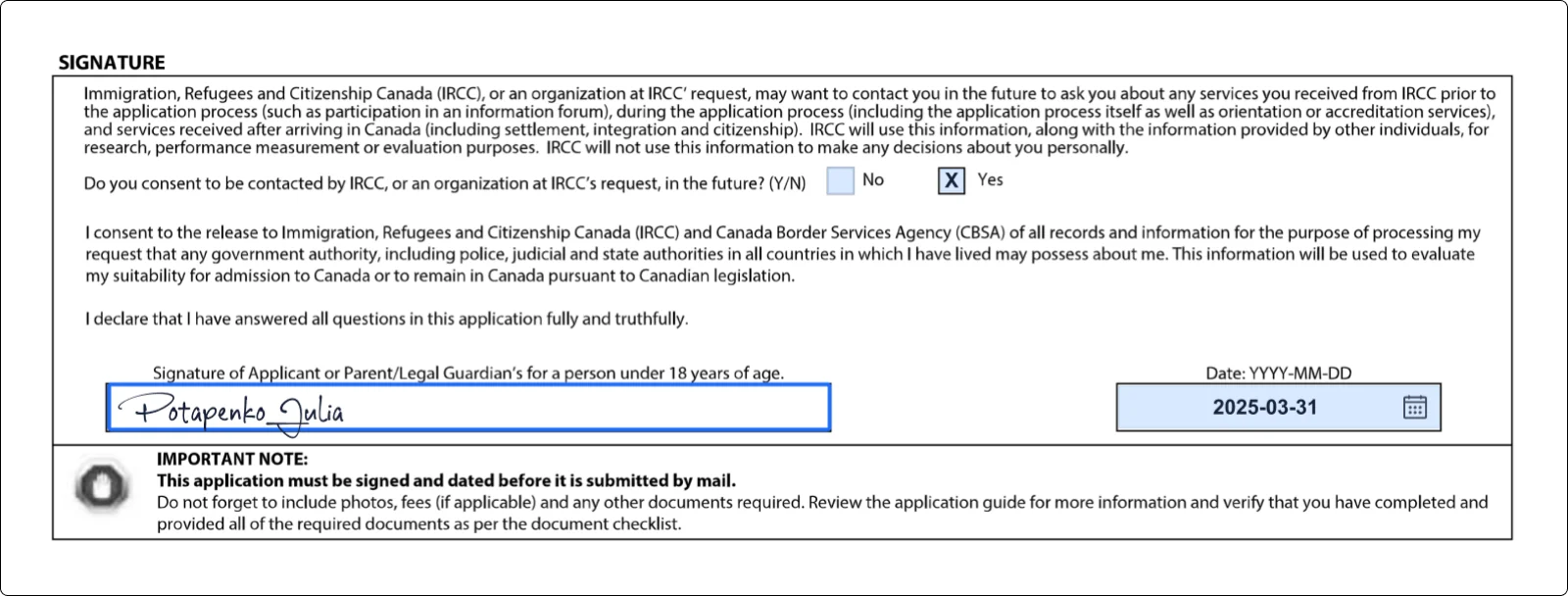
Step 17: Signature
To complete this practice copy, click the “Signature Field” and use one of the methods to create your e-signature. On the real application, sign as IRCC instructs: online applicants sign electronically in their IRCC account, and paper applications are signed and dated in pen.
How To Submit IMM 5710
PDFLiner doesn’t offer a submission feature for this application. Here, you can fill in your trial version of the form and share it with your consultant. Using a representative is optional, and anyone you pay to represent you must be authorized.
To submit an application, complete and validate the official form using the IRCC form and instructions, not this PDFLiner sample. Most applicants must apply online through their IRCC account. Applicants extending a post-graduation work permit or changing its conditions must use IRCC's paper-application route for PGWP holders. Other paper routes include applicants prevented from applying online by a disability or a problem with the online application. An in-Canada application for a temporary resident permit together with an open work permit is sent by mail under IRCC's separate TRP instructions. IRCC charges fees (IRCC fee list, September 2026: CAD 155 for a work permit, including extensions; CAD 100 open work permit holder fee when it applies; restoring your status costs CAD 246.25 plus the work permit fee); check the current fees before you pay.
To share the application sample with your consultant, click the Share button and choose the Share option there. Enter the email address and click Share button.
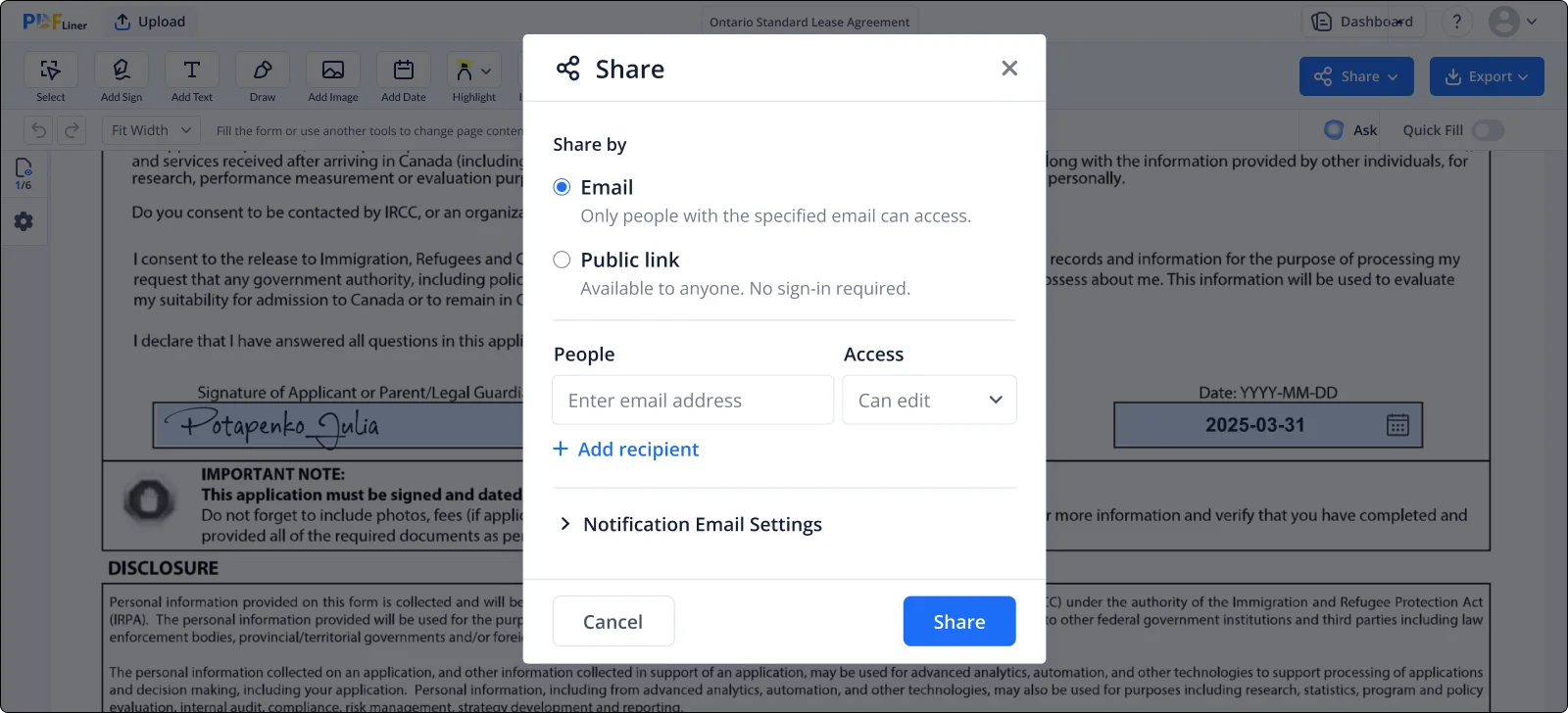
Table of contents
Simple Way To Pre-File the Application
Our easy-to-use service lets you quickly complete, sign, and share the form with your consultant to check.
Related Documents




Learn how to fill in the application