-
Templates
1099 FormsAccurately report 1099 information returns and ensure IRS filing with easeExplore all templatesW-9 W-8 FormsEasily manage and share taxpayer details to streamline payments and meet IRS requirements with confidenceExplore all templatesOther Tax FormsFillable tax forms simplify and speed up your tax filing process and aid with recordkeeping.Explore all templatesReal EstateReal estate templates for all cases, from sale to rentals, save you a lot of time and effort.Explore all templatesLogisticsSimplify your trucking and logistics paperwork with our ready-to-use transportation and freight templates.Explore all templatesMedicalMedical forms help you keep patient documentation organized and secure.Explore all templatesBill of SaleBill of Sale templates streamline the transfer of ownership with clarity and protection.Explore all templatesContractsVarious contract templates ensure efficient and clear legal transactions.Explore all templatesEducationEducational forms and templates enhance the learning experience and student management.Explore all templates
-
Features
FeaturesAI-Enhanced Document Solutions for Contractor-Client Success and IRS ComplianceExplore all featuresAI Summarizer Check out the featureAI PDF summarizer makes your document workflow even faster. Ask AI to summarize PDF, assist you with tax forms, complete assignments, and more using just one tool.Sign PDF Check out the featurePDFLiner gives the opportunity to sign documents online, save them, send at once by email or print. Register now, upload your document and e-sign it onlineFill Out PDF Check out the featurePDFLiner provides different tools for filling in PDF forms. All you need is to register, upload the necessary document and start filling it out.Draw on a PDF Check out the featureDraw lines, circles, and other drawings on PDF using tools of PDFLiner online. Streamline your document editing process, speeding up your productivity
- Solutions
- Features
- Blog
- Support
- Pricing
- Log in
- Sign Up


OREA Form 420, Amendment to - Agreement to Lease - Residential
Get your OREA Form 420, Amendment to - Agreement to Lease - Residential in 3 easy steps
-
01 Fill and edit template
![Fill OREA Form 420, Amendment to - Agreement to Lease - Residential]()
-
02 Sign it online
![Sign OREA Form 420, Amendment to - Agreement to Lease - Residential]()
-
03 Export or print immediately
![Export OREA Form 420, Amendment to - Agreement to Lease - Residential]()


What Is OREA Form 420?
OREA Form 420, "Amendment to – Agreement to Lease – Residential", is the Ontario Real Estate Association's form for changing the terms of an existing Agreement to Lease (OREA Form 400); both the landlord and the tenant sign the amendment. The blank on this page is the 2019 revision.
The document must be signed by both parties, the tenant and the landlord.
It is not simple to change the form entirely once you sign it. However, you can make amendments to the agreement if both parties agree. This is when you need to use this document. Make sure that the other party agrees with the decision to make amendments to the original version.
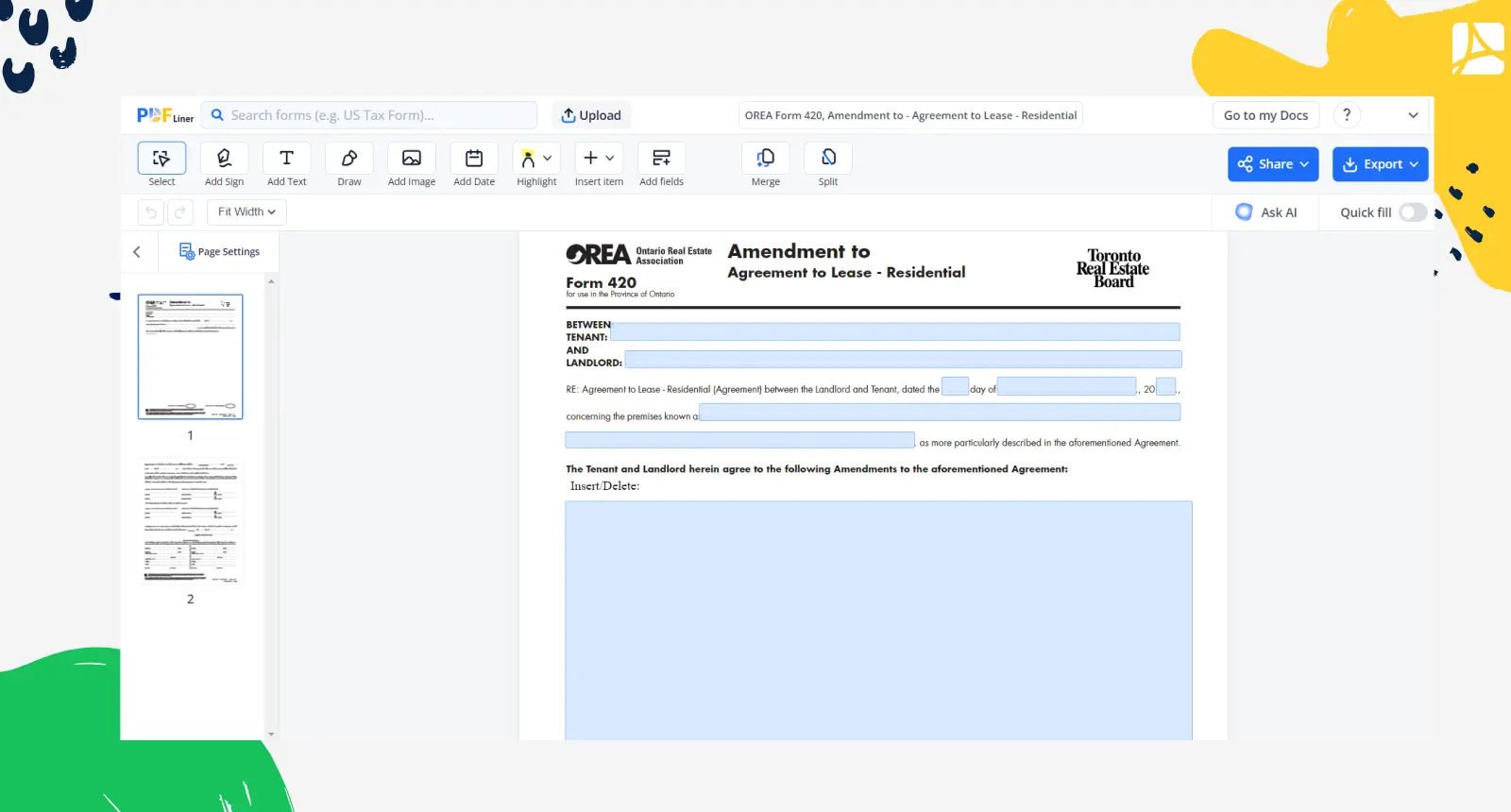
What I need the OREA form 420 for?
- You need to use an amendment to lease agreement if you are a tenant and want to specify some conditions of the original agreement which you can’t find in the previous version. You can ask the landlord to change the conditions of the rent if you need or change the deadline;
- As a landlord, you can use an amendment to lease agreement Ontario to change the rules of the tenancy if both parties agree. If your tenant does not want to sign the document, the original version is considered to be legal. You can change the agreement if both parties agree and sign the amendment.
How to Fill Out OREA Form 420?
Once you decide that you want to make changes to the original Agreement to Lease, you can use OREA Form 420. Both the landlord and the tenant sign the amendment, so make sure that there are no mistakes before signing.
Form 420 and the Ontario Standard Lease
The Agreement to Lease is the offer stage; once accepted it is a binding agreement to enter into the lease. For most private residential tenancies in Ontario, new tenancy agreements signed on or after April 30, 2018 must use the government's Residential Tenancy Agreement (Standard Form of Lease), Ontario form 047-2229 (December 2020 edition for covered new agreements signed on or after March 1, 2021). Once the tenancy is on the standard lease, changes agreed between the landlord and tenant must be recorded in writing (section 16 of the standard lease); the lease also notes that the Residential Tenancies Act, 2006 allows some rent increases and requires some rent reductions without agreement between the landlord and tenant. You can fill out the Ontario Standard Lease online.
PDFLiner offers you to complete the template online, using your computer, without the need to download it. There are tools that you can use to create your electronic signature as well. Once you finish the procedure, you can download the template on your device and save the original version just in case, print the paper version and provide it to the other party, or send the document via email. Here is what must be in the document:
- Provide the information on the tenant and landlord, including their names;
- Write down the date when the original document was signed by two parties;
- Write down the address of the real estate;
- Provide information on the changes you want to make in the original document;
- Have a witness sign next to each party's signature (the form provides witness lines);
- Sign the document and let the other party read and sign it. Put the current date;
- Give a copy to the brokerage, if one is involved.
Organizations that work with OREA form 420
- Ontario Real Estate Association;
- Canadian Real Estate Association.
PDFLiner is not affiliated with, endorsed by, or licensed by the Ontario Real Estate Association (OREA). OREA Standard Forms are copyright OREA and are developed for use by OREA members and licensees. The official current versions are maintained by OREA; the pre-set text of the form must not be altered when it is printed or reproduced.
Related Content - OREA Form 420, Amendment to - Agreement to Lease - Residential
-
![]() Ontario Rental Application Form 410What Is Ontario Form 410 Landlords in Ontario often use OREA renter application 410 to...
Ontario Rental Application Form 410What Is Ontario Form 410 Landlords in Ontario often use OREA renter application 410 to... -
![]() OREA Form 500What Is OREA Form 500? OREA Form 500 is the Ontario Real Estate Association's Agreement...
OREA Form 500What Is OREA Form 500? OREA Form 500 is the Ontario Real Estate Association's Agreement... -
![]() OREA Form 400 Agreement to Lease ResidentialWhat Is Fillable OREA Form 400? OREA Form 400 is a standard form developed by...
OREA Form 400 Agreement to Lease ResidentialWhat Is Fillable OREA Form 400? OREA Form 400 is a standard form developed by... -
![]() OREA Form 100 Agreement of Purchase and SaleWhat Is OREA Form 100? OREA Form 100 is an agreement of the purchase and...
OREA Form 100 Agreement of Purchase and SaleWhat Is OREA Form 100? OREA Form 100 is an agreement of the purchase and... -
![]() Form 570, Amendment to Agreement of Purchase and SaleWhat does this page offer? This page does not offer a document or an editor.
Form 570, Amendment to Agreement of Purchase and SaleWhat does this page offer? This page does not offer a document or an editor.



Fillable online OREA Form 420, Amendment to - Agreement to Lease - Residential