-
Templates
1099 FormsAccurately report 1099 information returns and ensure IRS filing with easeExplore all templatesW-9 W-8 FormsEasily manage and share taxpayer details to streamline payments and meet IRS requirements with confidenceExplore all templatesOther Tax FormsFillable tax forms simplify and speed up your tax filing process and aid with recordkeeping.Explore all templatesReal EstateReal estate templates for all cases, from sale to rentals, save you a lot of time and effort.Explore all templatesLogisticsSimplify your trucking and logistics paperwork with our ready-to-use transportation and freight templates.Explore all templatesBill of SaleBill of Sale templates streamline the transfer of ownership with clarity and protection.Explore all templatesContractsVarious contract templates ensure efficient and clear legal transactions.Explore all templatesEducationEducational forms and templates enhance the learning experience and student management.Explore all templates
-
Features
FeaturesAI-Enhanced Document Solutions for Contractor-Client Success and IRS ComplianceExplore all featuresAI Summarizer Check out the featureAI PDF summarizer makes your document workflow even faster. Ask AI to summarize PDF, assist you with tax forms, complete assignments, and more using just one tool.Sign PDF Check out the featurePDFLiner gives the opportunity to sign documents online, save them, send at once by email or print. Register now, upload your document and e-sign it onlineFill Out PDF Check out the featurePDFLiner provides different tools for filling in PDF forms. All you need is to register, upload the necessary document and start filling it out.Draw on a PDF Check out the featureDraw lines, circles, and other drawings on PDF using tools of PDFLiner online. Streamline your document editing process, speeding up your productivity
- Solutions
- Features
- Blog
- Support
- Pricing
- Log in
- Sign Up


Fillable Tax File Number Declaration
Get your Tax File Number Declaration in 3 easy steps
-
01 Fill and edit template
![Fill Tax File Number Declaration]()
-
02 Sign it online
![Sign Tax File Number Declaration]()
-
03 Export or print immediately
![Export Tax File Number Declaration]()


Introduction to ATO Tax File Declaration Form
The ATO Tax File Number Declaration Form is a crucial document in the Australian taxation system. This comprehensive guide provides all the essential information you need about this form, its importance, and how to fill it out correctly.
Current edition and how to complete it
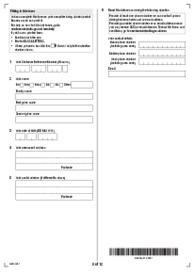
The ATO no longer offers the paper Tax file number declaration as a download. The current edition is NAT 3092-11.2024; the blank on this page is the earlier NAT 3092-06.2019 edition.
Your payer may have their own electronic form, so check with them first. If they don't, you can complete the declaration in ATO online services through myGov, once your myGov account is linked to the ATO; after you submit it, print the summary and give it to your employer. You need a paper form if you don't have a TFN or you are exempt from quoting one; order it from the ATO Publication ordering service. If you are entitled to the seniors and pensioners tax offset (SAPTO) and are under 65.5, complete a paper Withholding declaration (NAT 3093) instead of the online form.

What is ATO TFN Declaration Form
Individuals complete the Tax file number declaration and give it to their payer, who uses it to work out tax withholding.
Importance of ATO Tax File Number Declaration Form
The ATO Tax File Declaration Form plays an important role in the Australian taxation system, helping payers withhold the right amount of tax from payments to individuals.

How to Get the ATO TFN Declaration Form
The ATO no longer offers the paper form as a download. Order a paper copy from the ATO Publication ordering service, or complete the declaration online as described above.
Step-by-Step Guide to Fill out the ATO TFN Declaration Form
- Start by writing your full name as it appears on your official identification documents.
- Provide your TFN or select an applicable alternative in Question 1.
- Fill in your address, date of birth and other required personal details.
- Answer all the questions in the form accurately.
- Sign and date Section A, then give the declaration to your payer.
Tips on Filling out the ATO Tax File Number Declaration Form
- Always double-check your information for accuracy.
- Make sure to sign and date the form.
- Retain a copy of the form for your records.
FAQ:
-
Where can I download the ATO TFN Declaration Form?
The ATO no longer offers a downloadable version; you can order a paper copy from the ATO (order online).
-
What is the purpose of the ATO TFN Declaration Form?
You give the declaration to your payer, who uses the information to work out how much tax to withhold from payments to you.
-
How often do I need to submit the ATO TFN Declaration Form?
You need to submit this form each time you start a new job.
Related Content - Tax File Number Declaration
-
![]() AU NAT 3092What Is Tax File Number Declaration? NAT 3092, the Tax file number declaration, provides your...
-
![]() Form 1195What is Form 1195? Form 1195, Identity declaration, is a form of the Australian Department...
-
![]() Centrelink MOD P FormHow To Fill Out the MOD P Form Centrelink? Here are the steps to follow: Go...
-
![]() AU Employment Separation Certificate FormWhat is a Separation Certificate Form? Employment Separation Certificate is a form an employer completes...
-
![]() FA012 FormWhat Is Proof of Care Arrangements by Centrelink FA012, or Child Care Arrangement Form, is...




Fillable online Tax File Number Declaration