-
Templates
1099 FormsAccurately report 1099 information returns and ensure IRS filing with easeExplore all templatesW-9 W-8 FormsEasily manage and share taxpayer details to streamline payments and meet IRS requirements with confidenceExplore all templatesOther Tax FormsFillable tax forms simplify and speed up your tax filing process and aid with recordkeeping.Explore all templatesReal EstateReal estate templates for all cases, from sale to rentals, save you a lot of time and effort.Explore all templatesLogisticsSimplify your trucking and logistics paperwork with our ready-to-use transportation and freight templates.Explore all templatesBill of SaleBill of Sale templates streamline the transfer of ownership with clarity and protection.Explore all templatesContractsVarious contract templates ensure efficient and clear legal transactions.Explore all templatesEducationEducational forms and templates enhance the learning experience and student management.Explore all templates
-
Features
FeaturesAI-Enhanced Document Solutions for Contractor-Client Success and IRS ComplianceExplore all featuresAI Summarizer Check out the featureAI PDF summarizer makes your document workflow even faster. Ask AI to summarize PDF, assist you with tax forms, complete assignments, and more using just one tool.Sign PDF Check out the featurePDFLiner gives the opportunity to sign documents online, save them, send at once by email or print. Register now, upload your document and e-sign it onlineFill Out PDF Check out the featurePDFLiner provides different tools for filling in PDF forms. All you need is to register, upload the necessary document and start filling it out.Draw on a PDF Check out the featureDraw lines, circles, and other drawings on PDF using tools of PDFLiner online. Streamline your document editing process, speeding up your productivity
- Solutions
- Features
- Blog
- Support
- Pricing
- Log in
- Sign Up


DE 1296NER - New Employee Registry Benefit Audit
Get your DE 1296NER - New Employee Registry Benefit Audit in 3 easy steps
-
01 Fill and edit template
![Fill DE 1296NER - New Employee Registry Benefit Audit]()
-
02 Sign it online
![Sign DE 1296NER - New Employee Registry Benefit Audit]()
-
03 Export or print immediately
![Export DE 1296NER - New Employee Registry Benefit Audit]()


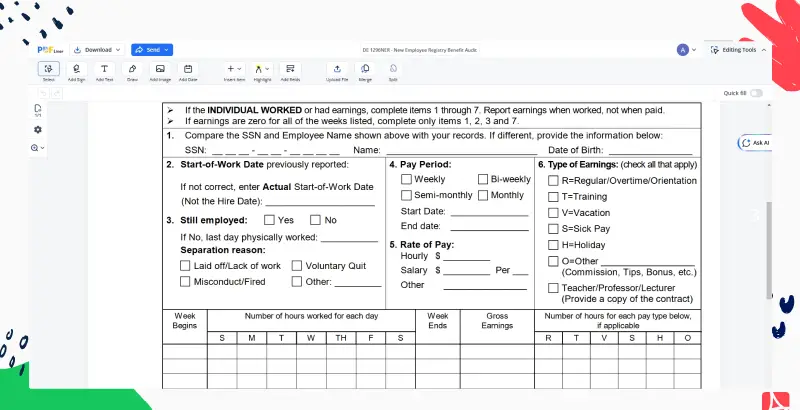
This guide is designed to provide a comprehensive understanding of this audit, its importance, and how to fill out the DE 1296NER form.
What is EDD New Employee Registry Benefit Audit
The EDD New Employee Registry Benefit Audit is a form the Employment Development Department (EDD) mails to employers to get information about a new employee who may also be collecting unemployment insurance benefits.
Importance of EDD New Employee Registry Benefit Audit
- Helps avoid penalties from non-compliance
How to Fill Out the DE 1296NER Form
- Complete the DE 1296NER audit that EDD sent to your business.
- Check the employee's name and Social Security number against your records and correct any differences.
- Verify the actual start-of-work date.
- Return the audit to EDD within 10 days of receipt.
Conclusion
If your business receives this audit, complete it and return it to EDD. The DE 1296NER form may seem daunting at first, but with the guide provided, it becomes a simpler task.
Related Content - DE 1296NER - New Employee Registry Benefit Audit
-
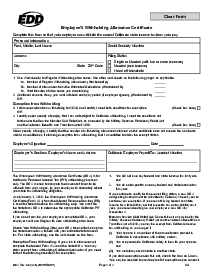
![]() Appeal Form DE 1000M Rev. 9 (3-26)What Is Form DE 1000M? Form DE 1000M is an Employment Development Department Appeal Form...
-
![]() Form DE 2501 - Claim for Disability Insurance BenefitsWhat is Claim for Disability Insurance Benefits? The Claim for Disability Insurance (DI) Benefits is...
-
![]() DE 8501 - First Claim for Nonindustrial Disability Insurance (NDI)What Is a California State Disability Form PDF? It is sometimes also called the Non-Industrial...
-
![]() Form DE 4 (California)What is Form DE 4? Form DE 4, Employee's Withholding Allowance Certificate, is the California...
-
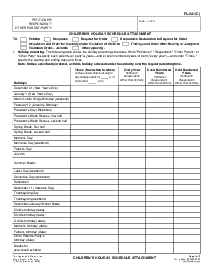
![]() FL-341(C) Children s Holiday Schedule AttachmentWhat Is Form FL-341(C)? Child Custody Holiday Schedule California, or an FL-341(C) form, is a...


Fillable online DE 1296NER - New Employee Registry Benefit Audit