-
Templates
1099 FormsAccurately report 1099 information returns and ensure IRS filing with easeExplore all templatesW-9 W-8 FormsEasily manage and share taxpayer details to streamline payments and meet IRS requirements with confidenceExplore all templatesOther Tax FormsFillable tax forms simplify and speed up your tax filing process and aid with recordkeeping.Explore all templatesReal EstateReal estate templates for all cases, from sale to rentals, save you a lot of time and effort.Explore all templatesLogisticsSimplify your trucking and logistics paperwork with our ready-to-use transportation and freight templates.Explore all templatesMedicalMedical forms help you keep patient documentation organized and secure.Explore all templatesBill of SaleBill of Sale templates streamline the transfer of ownership with clarity and protection.Explore all templatesContractsVarious contract templates ensure efficient and clear legal transactions.Explore all templatesEducationEducational forms and templates enhance the learning experience and student management.Explore all templates
-
Features
FeaturesAI-Enhanced Document Solutions for Contractor-Client Success and IRS ComplianceExplore all featuresAI Summarizer Check out the featureAI PDF summarizer makes your document workflow even faster. Ask AI to summarize PDF, assist you with tax forms, complete assignments, and more using just one tool.Sign PDF Check out the featurePDFLiner gives the opportunity to sign documents online, save them, send at once by email or print. Register now, upload your document and e-sign it onlineFill Out PDF Check out the featurePDFLiner provides different tools for filling in PDF forms. All you need is to register, upload the necessary document and start filling it out.Draw on a PDF Check out the featureDraw lines, circles, and other drawings on PDF using tools of PDFLiner online. Streamline your document editing process, speeding up your productivity
- Solutions
- Features
- Blog
- Support
- Pricing
- Log in
- Sign Up


Ontario Rental Application Form
Get your Ontario Rental Application Form in 3 easy steps
-
01 Fill and edit template
![Fill Ontario Rental Application Form]()
-
02 Sign it online
![Sign Ontario Rental Application Form]()
-
03 Export or print immediately
![Export Ontario Rental Application Form]()


What Is an Ontario Rental Application?
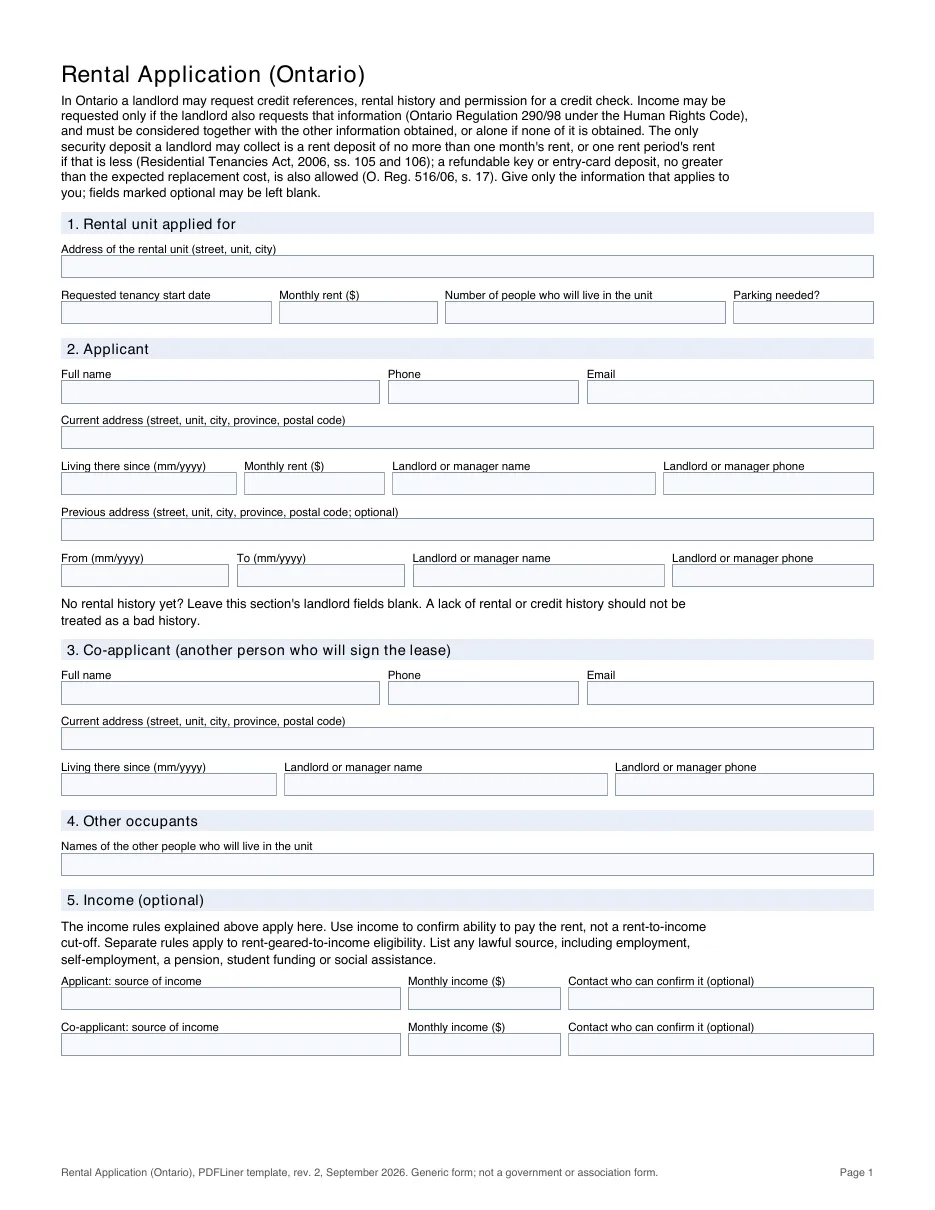
A rental application helps a landlord assess a prospective tenant. This is PDFLiner's optional generic application, not a prescribed government form. The lease itself, for most private residential tenancies with agreements signed on or after April 30, 2018, must be the Ontario Standard Lease (form 047-2229; agreements signed since March 1, 2021 use the edition dated December 2020), with exceptions such as care homes, most social and supportive housing and co-operative housing. The template on this page is PDFLiner's own generic rental application for Ontario. It is not a government form and not an Ontario Real Estate Association (OREA) form. It was drafted around the limits that Ontario's Human Rights Code and its Regulation 290/98 put on tenant screening, but it is not a certification that every field is necessary or lawful in every rental situation.
What a landlord may ask in Ontario
Regulation 290/98 under the Human Rights Code lists the business practices a landlord may use to select a tenant: it may ask for credit references and rental history, ask your permission to run a credit check, and require a guarantee for the rent. It may ask about income only if it also asks for that other information, and it must consider income together with whatever it receives; income alone may be considered only when nothing else is obtained. Separate rules apply to rent-geared-to-income eligibility in social housing.
The Ontario Human Rights Commission's rental housing policy adds that income information should be limited to confirming that you can pay the rent, that outside rent-geared-to-income housing, applying a rent-to-income cut-off such as 30% is illegal, and that a lack of rental or credit history should not be viewed negatively. In the Commission's view nothing in Regulation 290/98 permits asking about employment history, and landlords should use means other than a Social Insurance Number for credit checks. A guarantor may be appropriate where an applicant has poor references, a poor credit history or a history of default, but the landlord must apply the same requirements to all applicants, must not require one simply because a person belongs to a protected group, and cannot hold the guarantor to an income ratio it could not impose on you.
The Human Rights Code gives everyone the right to equal treatment in housing without discrimination because of race, ancestry, place of origin, colour, ethnic origin, citizenship, creed, sex, sexual orientation, gender identity, gender expression, age, marital status, family status, disability or the receipt of public assistance, subject to the exceptions in the Code. Some screening answers can still reveal a protected characteristic, for example a date of birth reveals age and a source of income can reveal that you receive social assistance; a landlord must not use them to discriminate.
Deposits and credit checks
Under the Residential Tenancies Act, 2006, the only security deposit a landlord may collect is a rent deposit. It may be required on or before entering into the tenancy agreement, may not be more than one month's rent, or one rent period's rent if that is less, and must be applied to the rent for the last rent period before the tenancy ends. Separately, a landlord may take a refundable deposit for keys, remote entry devices or cards, no greater than the expected direct replacement cost. If the landlord does not give you vacant possession of the unit, it must repay the rent deposit. If, before possession would otherwise be given, you agree to rent a different unit from that landlord, the deposit may be applied to that unit; any amount above the permitted rent deposit for the replacement unit must be repaid.
Under Ontario's Consumer Reporting Act, credit checks need notice: use each applicant's separate authorization and the written notice in section 8, and you can ask whether a report is used and obtain the reporting agency's name and address. If information from a reporting agency or another person contributes to a refusal, the landlord must give you a notice when it tells you its decision, in bold or underlined type of at least 10 points. The notice must explain that you may request disclosure within 60 days: the agency's name and address, or the nature and source of information supplied by another person.
What the template covers
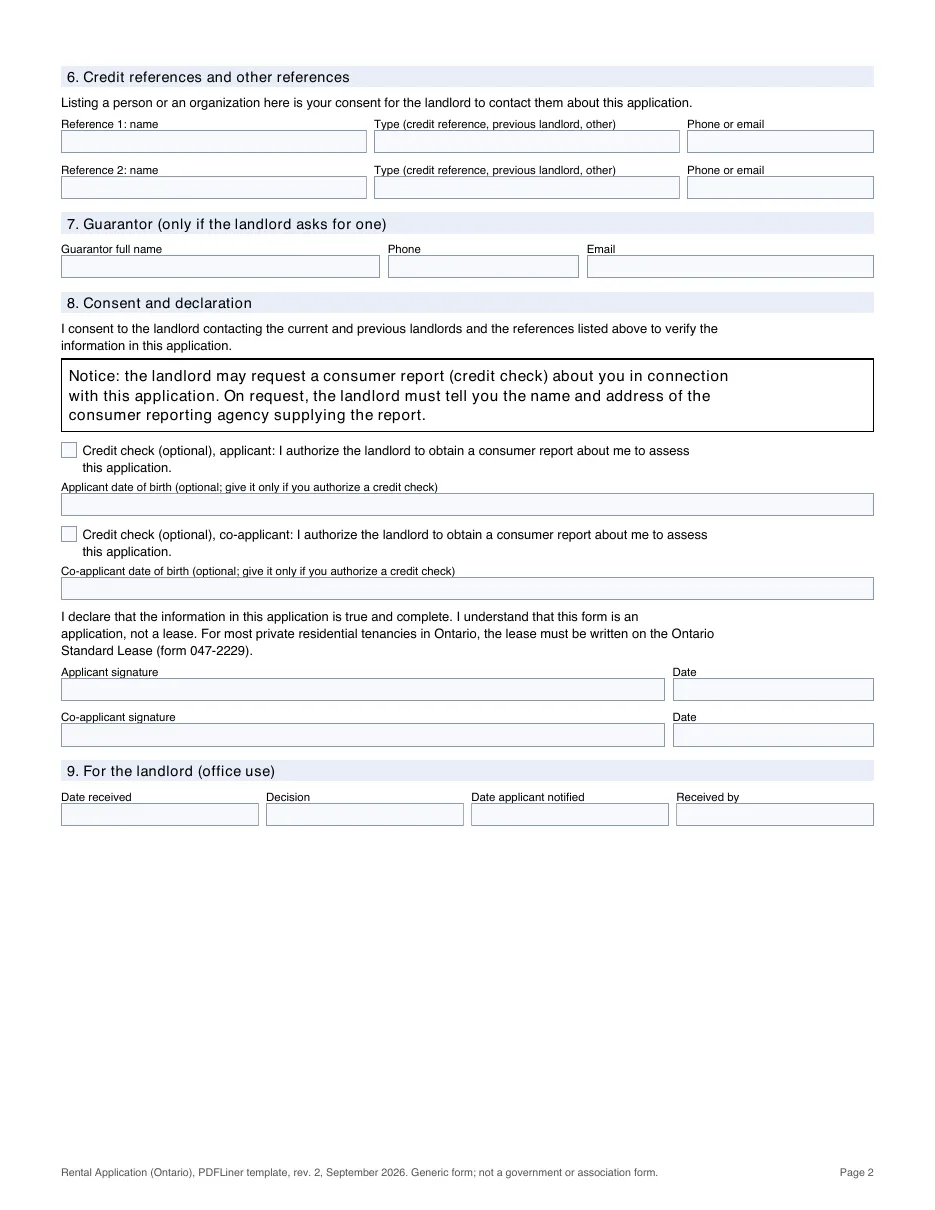
The template has two pages and nine sections: the rental unit applied for; the applicant, with current and optional previous address and landlord contacts; a co-applicant (another person who will sign the lease); other occupants (names only); optional income from any lawful source; credit references and other references (listing them is your consent to be contacted); a guarantor, only if the landlord asks for one; consent and declaration, with a boxed credit-check notice, a separate optional credit-check authorization and optional date of birth for the applicant and for the co-applicant; and an office-use block for the landlord. It does not ask for employment history, a Social Insurance Number, banking or credit card details, a copy of your ID, pets, or occupants' relationship to you.
How to Fill Out the Ontario Rental Application
- Open the template in the PDFLiner editor and enter the address of the rental unit, your requested start date, the monthly rent and the number of people who will live there (section 1).
- Fill in your name, contact details and current address in section 2, with your current landlord's or manager's name and phone. The previous address is optional; if you have no rental history yet, leave the landlord fields blank.
- If another person will sign the lease, complete section 3 for them; list the names of other occupants in section 4. Ontario also protects the housing and contracting rights of 16- and 17-year-olds who have withdrawn from parental control.
- Section 5 is optional. If the landlord asks about income, give the source and monthly amount; any lawful source counts, including employment, self-employment, a pension, student funding or social assistance.
- List up to two credit references or other references in section 6, and a guarantor in section 7 only if the landlord has asked for one.
- Read the notice in section 8. Each applicant makes their own credit-check choice: tick only your own box if you agree to a report about you, and add your date of birth only in that case. Leaving the box blank does not authorize a check.
- Sign and date with the "Sign Field" tool (the co-applicant signs on the second line), then download the PDF or send it to the landlord. By signing you confirm the information is true and acknowledge that this form is an application, not a lease. Section 9 is for the landlord.
Tips for a successful rental application
- Tell your references you have listed them, so they expect the landlord's call.
- If you have little credit or rental history, a reference letter or a guarantor can help; the landlord should not treat the lack of history as a bad history.
- If a landlord asks for something this template leaves out, such as a Social Insurance Number or banking details, you can ask why it is needed.
- Once you are accepted, ask for the Ontario Standard Lease and read it before you pay or move in. Signing this application is not signing a lease, but in Ontario a tenancy agreement can also be oral or implied, so agree on the terms before you commit.
Related Content - Ontario Rental Application Form
-
![]() BC 10 Day Notice to End TenancyNavigating the eviction process can often be challenging for landlords and property managers. This article...
BC 10 Day Notice to End TenancyNavigating the eviction process can often be challenging for landlords and property managers. This article... -
![]() BC Contract of Purchase and SaleWhat Is BC Contract of Purchase and Sale? The BC contract of purchase and sale...
BC Contract of Purchase and SaleWhat Is BC Contract of Purchase and Sale? The BC contract of purchase and sale... -
![]() BC Rental Application FormWhat Is a BC Rental Application? A rental application is the form a landlord uses...
BC Rental Application FormWhat Is a BC Rental Application? A rental application is the form a landlord uses... -
![]() BC Basic Addendum to Real Estate Purchase and Sale AgreementThe Ultimate Guide to the BC Basic Addendum to Real Estate Purchase and Sale Agreement...
BC Basic Addendum to Real Estate Purchase and Sale AgreementThe Ultimate Guide to the BC Basic Addendum to Real Estate Purchase and Sale Agreement... -
![]() BC Tenancy Agreement AddendumHow to Expertly Fill Out a BC Tenancy Agreement Addendum Navigating the complexities of rental...
BC Tenancy Agreement AddendumHow to Expertly Fill Out a BC Tenancy Agreement Addendum Navigating the complexities of rental...




Fillable online Ontario Rental Application Form