-
Templates
1099 FormsAccurately report 1099 information returns and ensure IRS filing with easeExplore all templatesW-9 W-8 FormsEasily manage and share taxpayer details to streamline payments and meet IRS requirements with confidenceExplore all templatesOther Tax FormsFillable tax forms simplify and speed up your tax filing process and aid with recordkeeping.Explore all templatesReal EstateReal estate templates for all cases, from sale to rentals, save you a lot of time and effort.Explore all templatesLogisticsSimplify your trucking and logistics paperwork with our ready-to-use transportation and freight templates.Explore all templatesBill of SaleBill of Sale templates streamline the transfer of ownership with clarity and protection.Explore all templatesContractsVarious contract templates ensure efficient and clear legal transactions.Explore all templatesEducationEducational forms and templates enhance the learning experience and student management.Explore all templates
-
Features
FeaturesAI-Enhanced Document Solutions for Contractor-Client Success and IRS ComplianceExplore all featuresAI Summarizer Check out the featureAI PDF summarizer makes your document workflow even faster. Ask AI to summarize PDF, assist you with tax forms, complete assignments, and more using just one tool.Sign PDF Check out the featurePDFLiner gives the opportunity to sign documents online, save them, send at once by email or print. Register now, upload your document and e-sign it onlineFill Out PDF Check out the featurePDFLiner provides different tools for filling in PDF forms. All you need is to register, upload the necessary document and start filling it out.Draw on a PDF Check out the featureDraw lines, circles, and other drawings on PDF using tools of PDFLiner online. Streamline your document editing process, speeding up your productivity
- Solutions
- Features
- Blog
- Support
- Pricing
- Log in
- Sign Up


MC 2117 I Instructions for Completing Schedule A/B
Get your MC 2117 I Instructions for Completing Schedule A_B in 3 easy steps
-
01 Fill and edit template
![Fill MC 2117 I Instructions for Completing Schedule A_B]()
-
02 Sign it online
![Sign MC 2117 I Instructions for Completing Schedule A_B]()
-
03 Export or print immediately
![Export MC 2117 I Instructions for Completing Schedule A_B]()


What Is MC 2117 I?
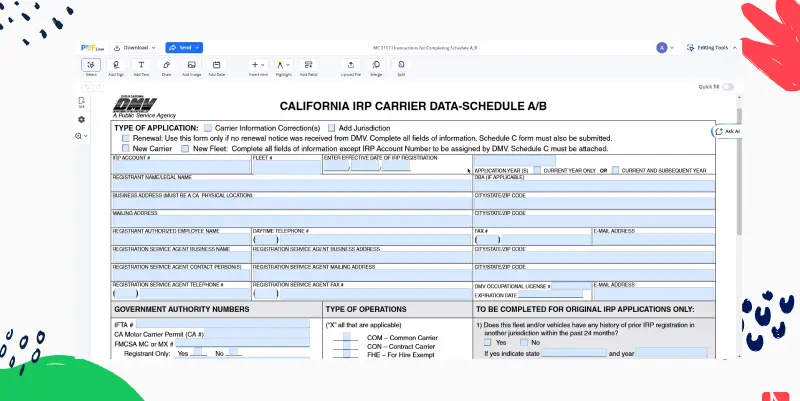
MC 2117 I, Instructions for Completing Schedule A/B, is a California DMV document for motor carriers registering vehicles under the International Registration Plan (IRP). It explains how to fill in Schedule A (carrier information) and Schedule B (the mileage report) of an IRP application.
What the Instructions Cover
- When the front of the form is needed: carrier information corrections, renewals without a preprinted DMV renewal application, and new carrier or fleet accounts.
- When the back of the form (mileage report) is needed: new or original, renewal and add-jurisdiction applications.
- IRP account number ("New" for a new carrier or fleet), optional fleet number, and the effective date of IRP operation, which should match Schedule C. Penalties may apply when fees are paid more than 20 days after the effective date, or for renewals paid after expiration.
- Application year: when a vehicle is added within 60 days of the fleet expiration date, both the current and subsequent year are marked and two Schedule B mileage reports are submitted.
- Registrant legal name and DBA, a physical California business address where fleet records are kept (not a registration service agent's address), the mailing address, and the authorized employee's contact details.
- Registration service agent details, if a DMV-licensed agent represents the registrant.
Follow the full instructions printed on the document when completing your Schedule A/B.
Related Content - MC 2117 I Instructions for Completing Schedule A_B
-
![]() Form DS-82What is DS-82? DS-82 is the U.S. Passport Renewal Application for Eligible Individuals from the...
-
![]() Form I-539What is Form I-539? Form I-539 is the Application to Extend/Change Nonimmigrant Status from U.S....
-
![]() The Salvation Army Employment ApplicationWhat Is Salvation Army Employment Application Form? Searching for ways to make a difference in...
-
![]() Af Form 1098You can get the form online at here at PDFliner. Log In and go to...
-
![]() Form PT-472NS, Georgia Department of RevenueWhat Is Georgia Form PT-472NS? The blank on this page is Georgia Department of Revenue...


Fillable online MC 2117 I Instructions for Completing Schedule A_B